Accounting (General Ledger)
The heart of the system: chart of accounts, journal entries, fiscal years, cost centers, receipt and payment vouchers, cheques, bank reconciliation and year closing. Every posted document in every other module lands its journal entry here automatically.
Branches
Route: Accounting › Branches — /accounting/branches
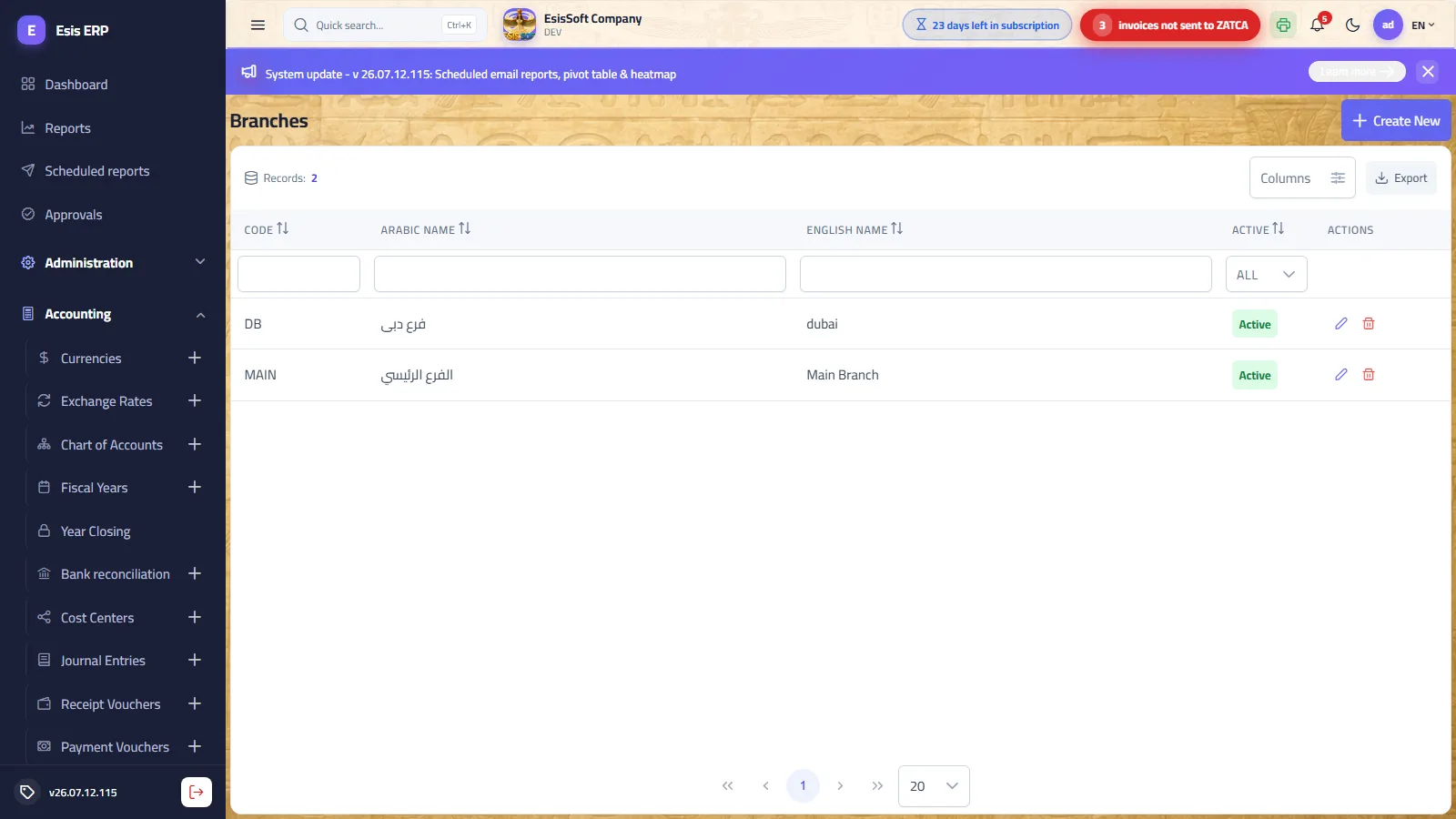
Purpose: define company branches. A branch is a posting dimension: every document and journal entry is tagged with its branch, so you can produce a trial balance and financial statements per branch while sharing one chart of accounts. Use it whenever the company operates from more than one location, or whenever you want results split by outlet or division.
Fields (add / edit page)
| Field | Required | What to enter |
|---|---|---|
| Code | Yes (on creation) | A short unique code, stored in UPPERCASE (e.g. MAIN, RYD). Set once at creation — read-only afterwards. |
| Arabic Name | Yes | The branch name shown on documents and in dropdowns. |
| English Name | No | If left empty, the Arabic name is used for it automatically. |
| Active | — | Shown only in edit mode. An inactive branch disappears from pickers but keeps all its history. |
Actions
- Create on the list opens a full add page; each row has Edit and Delete.
- The edit page offers Save, Save & New (save, then a fresh empty form) and Back, plus a side panel of record notes.
How branches are used
- New journal entries and vouchers preset the branch to the user's default branch (from the user card); otherwise to the company's main branch.
- If the user's permission scope allows exactly one branch, the branch box is locked on that branch.
- Reports (trial balance, statements) can be filtered by branch.
Validation & common errors
| Message | Cause / what to do |
|---|---|
| “Branch code already exists.” | Codes are unique — pick a different code. |
| “This branch has journal entries and cannot be deleted.” | History protection. Mark the branch inactive instead of deleting it. |
| “The company must keep at least one branch.” | You cannot delete the last remaining branch. |
FAQ
Can I rename a branch after documents were posted on it?
Yes — the names can be edited at any time; only the code is fixed.
We closed a branch. How do I retire it?
Open it for edit and untick Active. It vanishes from all pickers while its documents and reports remain intact.
Currencies & exchange rates
Route: Accounting › Currencies / Exchange Rates — /accounting/currencies, /accounting/exchange-rates
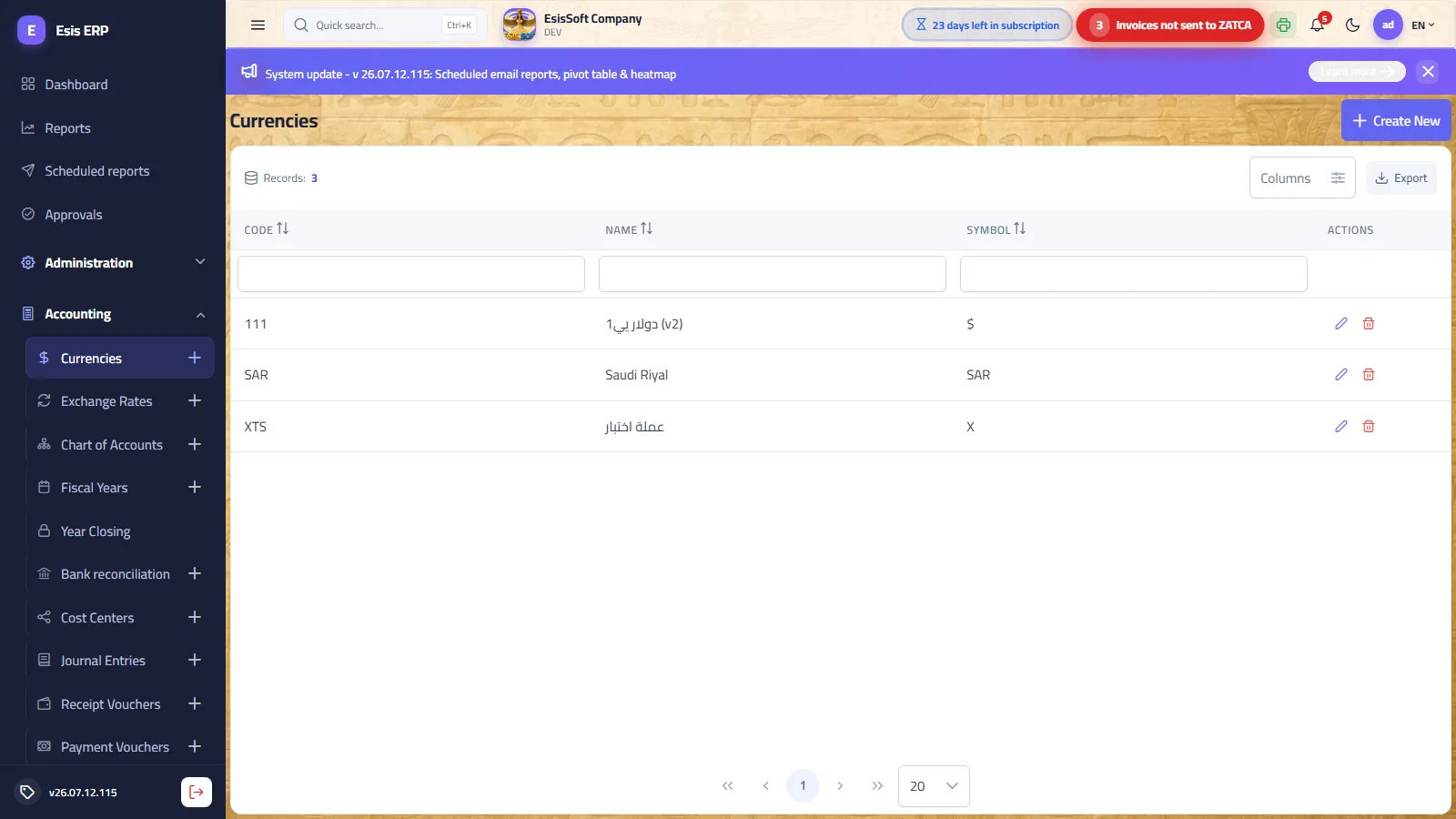
Purpose: the system is multi-currency. Define here every currency you trade in; the company's base currency is fixed at company level, and all ledger totals are kept in it.
Currency fields
| Field | Required | What to enter |
|---|---|---|
| Code | Yes (min. 3 characters) | The ISO 4217 code, e.g. USD, EUR, SAR. Set once — read-only in edit mode. |
| Name | Yes | Display name, e.g. “US Dollar”. |
| Symbol | Yes | The short symbol printed next to amounts, e.g. $. |
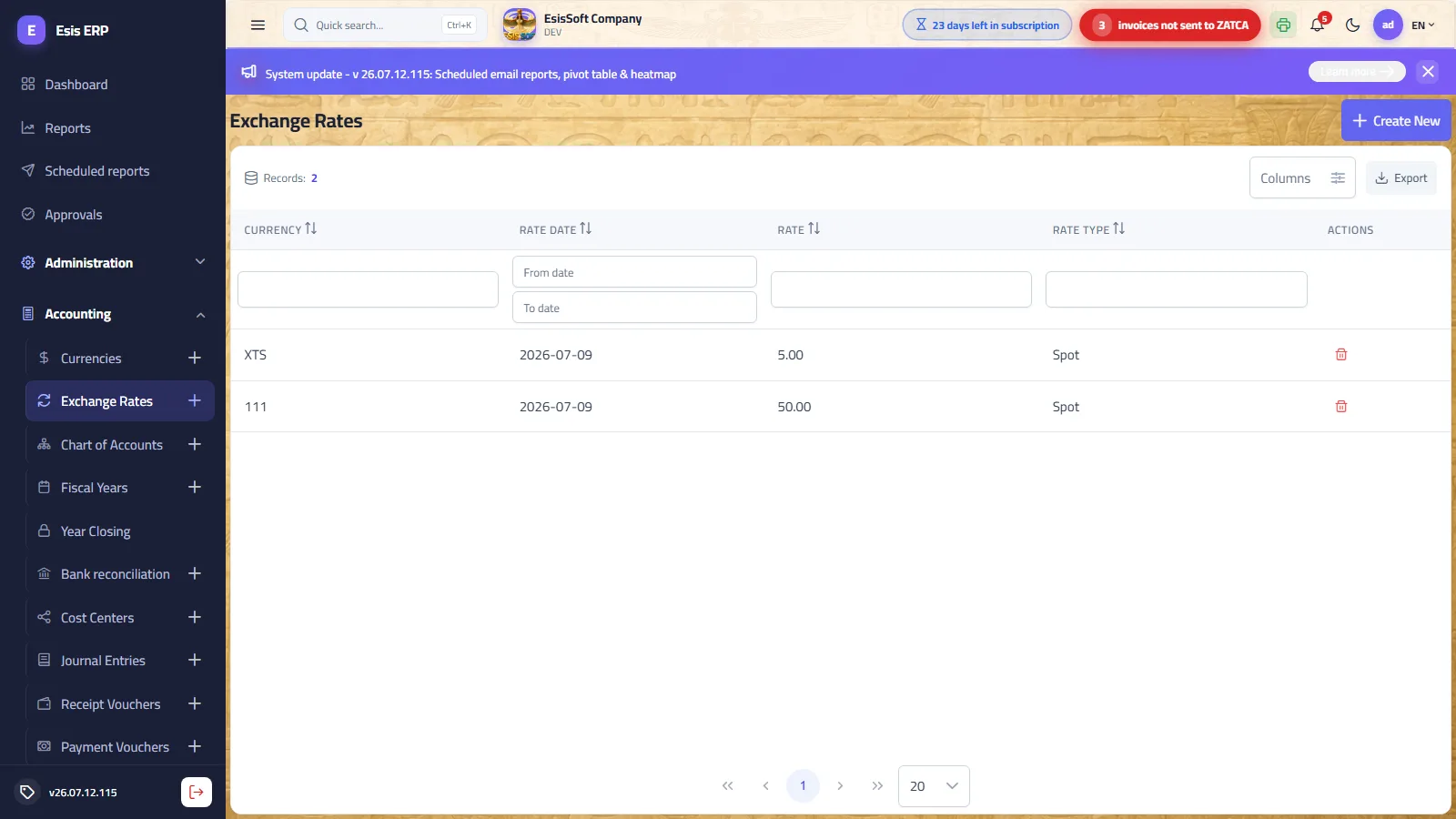
Exchange-rate fields
| Field | Required | What to enter |
|---|---|---|
| Currency | Yes | Pick the foreign currency by its code. |
| Rate Date | Yes | The date the rate takes effect (defaults to today). |
| Rate | Yes | Units of base currency per 1 unit of the foreign currency; up to 6 decimal places. |
| Rate Type | Yes | Spot (default, used by documents), Average or Closing (for reporting/valuation). |
The exchange-rate screen is append-only: a rate for a new date is a new row; there is no edit. If you typed a wrong rate, delete the row and add it again. New foreign-currency documents automatically pick the latest effective rate, editable per document via the currency picker on the document itself.
Worked example
- Base currency is SAR. Add currency
USD/ “US Dollar” / “$”. - In Exchange Rates: currency
USD, date 2026-01-15, rate 3.7500, type Spot. - A receipt voucher in USD for 1,000 on 2026-01-20 loads rate 3.7500 → recorded as 3,750.00 in the ledger.
Validation & common errors
| Message | Cause / what to do |
|---|---|
| “Currency code must be at least 3 characters” | Use the 3-letter ISO code. |
| “Currency code already exists.” | The currency is already defined. |
| “An exchange rate for this currency, date and rate type already exists.” | One rate per currency + date + type. Delete the old row first if it was wrong. |
| “Currency 'X' is in use and cannot be deleted.” | Documents reference it — it must remain. |
FAQ
Do I need daily rates?
No. Documents take the most recent rate on or before their date, so enter a new rate only when it changes materially — and you can always adjust the rate on the document itself.
Can I change the base currency later?
No — it is fixed when the company is created, because every ledger balance is stored in it.
Chart of Accounts
Route: Accounting › Chart of Accounts — /accounting/chart-of-accounts
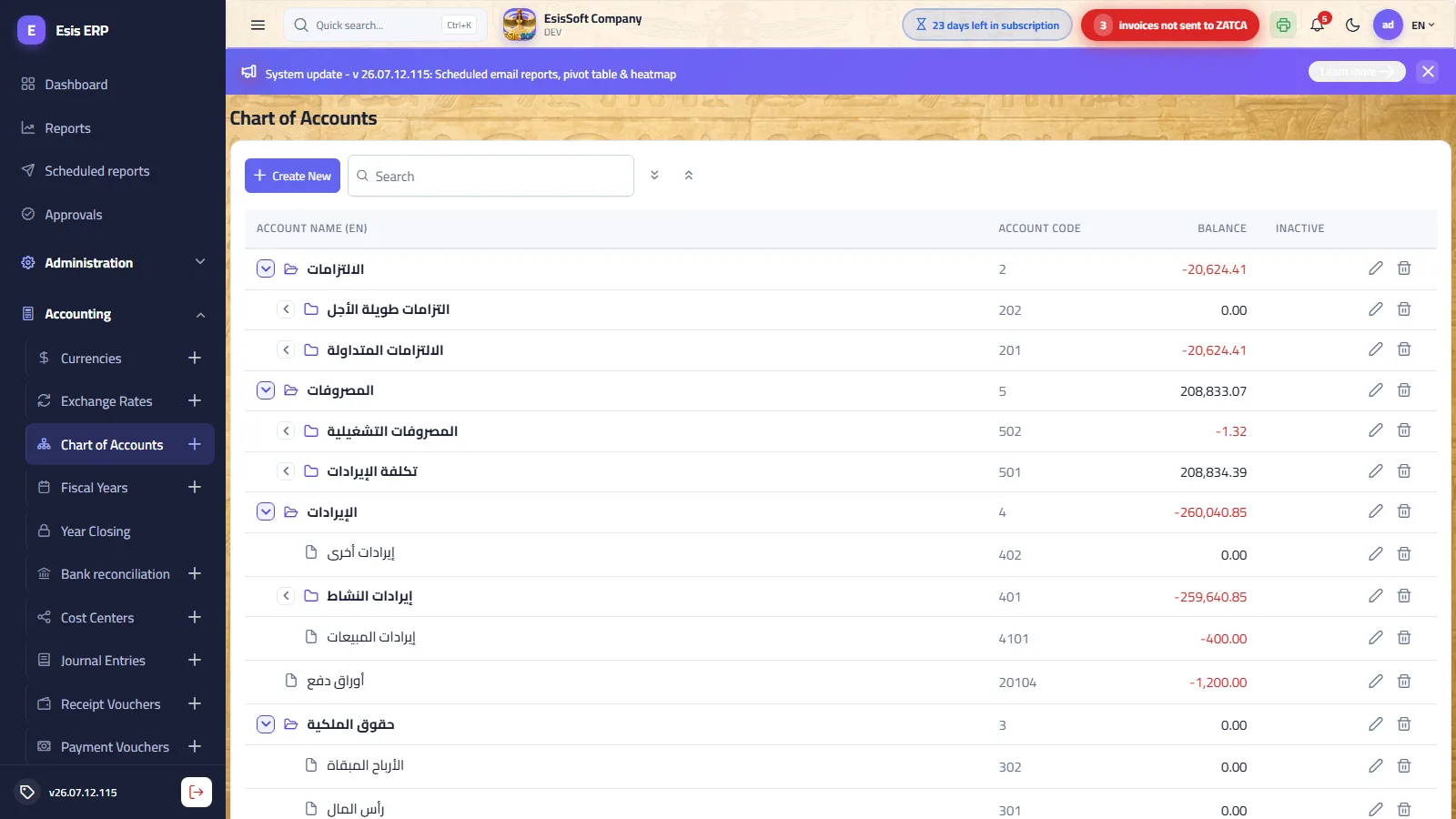
Purpose: the company's account tree with unlimited levels: assets, liabilities, equity, revenue, expenses. Header (group) accounts aggregate; journal entries are recorded only on leaf accounts.
The tree screen
- Search filters by code or name (Arabic or English) and keeps each match's ancestor chain visible so you never lose context; expand-all / collapse-all buttons sit next to it.
- The Balance column shows the rolled-up net (debits − credits) of the account including all of its descendants — a parent's balance is its whole subtree.
- An Inactive mark column flags retired accounts; each row has Edit and Delete.
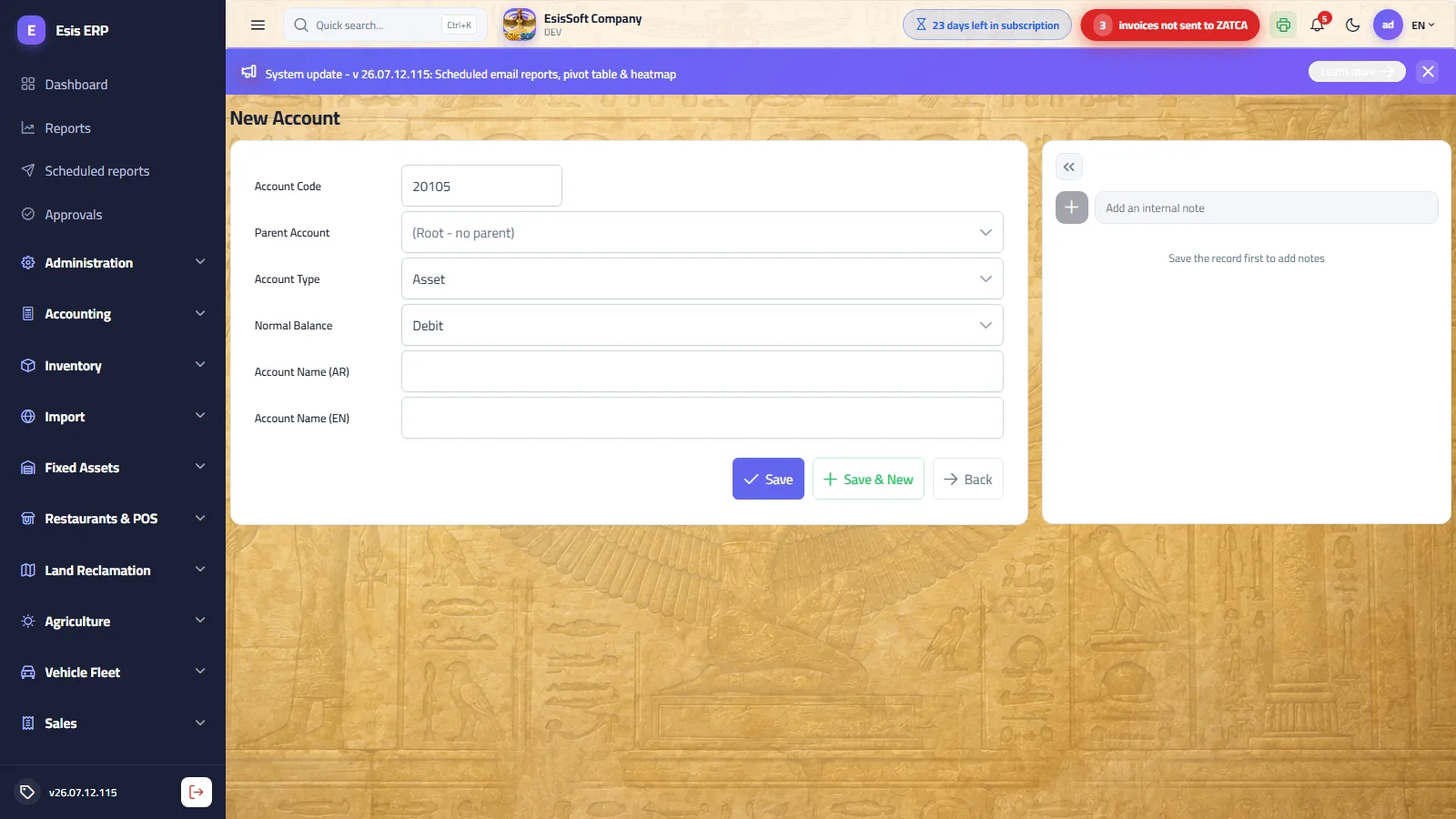
Fields (add / edit page)
| Field | Required | What to enter |
|---|---|---|
| Account Code | Auto | Read-only preview. The moment you pick a parent, the next free child code is generated and shown (e.g. parent 11 → 1101). Never typed by hand. |
| Parent Account | No | Position in the tree. Leave empty for a new root. Only accounts without direct postings are offered — a posted account cannot become a parent. Locked in edit mode (no re-parenting). |
| Account Type | Yes (roots only) | Asset / Liability / Equity / Revenue / Expense — drives financial-statement behavior. A child inherits its parent's type and the field locks. |
| Normal Balance | Yes (roots only) | Debit or Credit. Inherited and locked exactly like the type. |
| Account Name (AR) | Yes | The Arabic account name. |
| Account Name (EN) | No | Falls back to the Arabic name if left empty. |
| Active | — | Edit mode only. Inactive accounts stay in history. |
Worked example
- Under root
1“Assets” create header11“Current assets” (pick parent = 1; code previews 11). - With parent = 11, add
1101“Cash on hand” and, via Save & New,1102“Banks” — type Asset / nature Debit are inherited and locked. - Post entries only to 1101/1102; the tree shows their sum rolled up on 11 and 1.
Validation & common errors
| Message | Cause / what to do |
|---|---|
| “Account code 'X' already exists.” | Rare race when two users add under the same parent — just save again. |
| “'X' has child accounts and cannot be deleted.” | Delete or move the children first (children cannot be re-parented — plan the tree before posting). |
| “'X' has journal entry lines and cannot be deleted.” | Posted history is never orphaned. Deactivate the account instead. |
| “'X' does not allow posting.” | You tried to post to a header/group account — pick a leaf account. |
FAQ
Why is an account missing from the journal-entry dropdown?
Only leaf (non-group) accounts are listed. If it became a parent, post to its children instead.
Can I move an account under a different parent?
No — the code is derived from the parent, so re-parenting is not allowed. Create the account in the right place and deactivate the old one.
Why can't I choose a certain account as a parent?
It already carries direct postings. An account can be a header or a posting account, never both.
Fiscal years
Route: Accounting › Fiscal Years — /accounting/fiscal-years
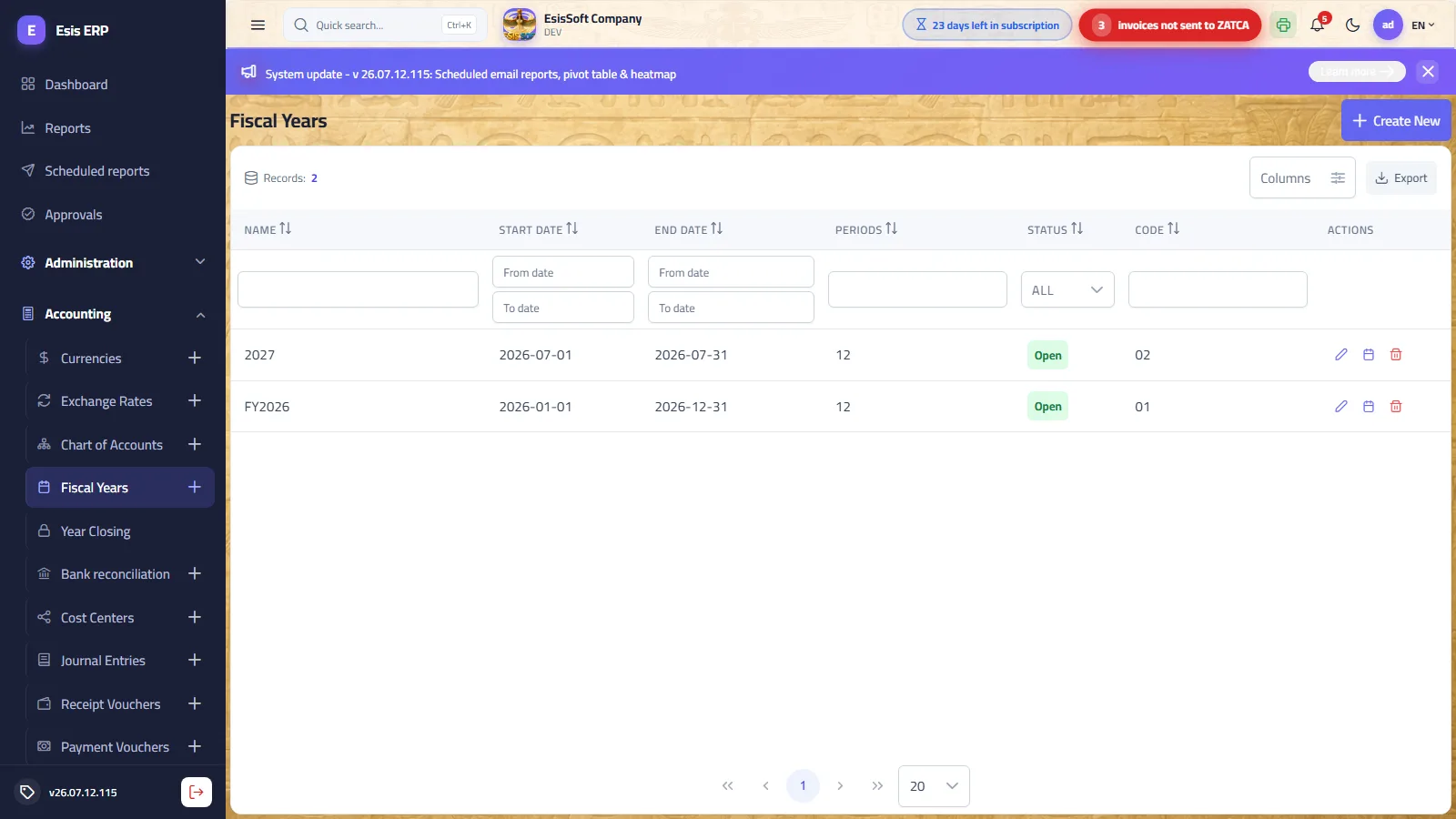
Purpose: open fiscal years and split them into accounting periods. Every posting resolves its fiscal year and period from the document date; the system refuses to post any document dated in a closed period or outside any generated period — your protection against back-dated entries.
Fields (add / edit page)
| Field | Required | What to enter |
|---|---|---|
| Code | Auto | Read-only, auto-incremented. |
| Name | Yes | Unique name, e.g. “FY 2026”. |
| Start / End Date | Yes | Defaults to the current calendar year (Jan 1 – Dec 31). Any 12-month (or other) range is allowed. |
| Active | — | Administrative flag. |
| Status | Read-only | Open / Closed. Changed only on the Year Closing screen — never here. |
Setting up a year
- Click New, check the suggested dates, Save — you stay on the page.
- Click Generate periods and choose Monthly (12) or Quarterly (4).
- On the list, the calendar row-action opens a read-only dialog of the periods (number, start, end, status).
- When going live, enter the opening balances on their own screen — it builds the opening entry for you and will not let you save a grid that does not balance.
Actions
- Row actions: Edit, View periods, Delete (hidden once the year is closed).
- Edit page: Save (stays on the page so you can generate periods right after), Save & New, Generate periods, Back.
- Locking/unlocking individual periods happens on the Year Closing screen.
Validation & common errors
| Message | Cause / what to do |
|---|---|
| “Fiscal year 'X' already exists.” | Names are unique. |
| “Fiscal year 'X' is closed and cannot be edited / deleted.” | Reopen it on the Year Closing screen first (administrators only). |
| “Cannot regenerate periods…” (closed year / closed periods / journal entries exist) | Periods can only be regenerated while the year is untouched. |
| “Cannot change the dates: …” | Once a period is closed or entries exist, the date range is frozen. |
| “Fiscal year 'X' has journal entries and cannot be deleted.” | History protection. |
FAQ
Why can't I post a document dated in January?
Either no fiscal year/period covers that date (generate the periods) or the January period is closed — check the Year Closing screen.
Monthly or quarterly periods?
Monthly gives a tighter close discipline (lock each month after review); quarterly suits smaller entities. You can regenerate as long as nothing was posted.
Cost centers
Route: Accounting › Cost Centers — /accounting/cost-centers
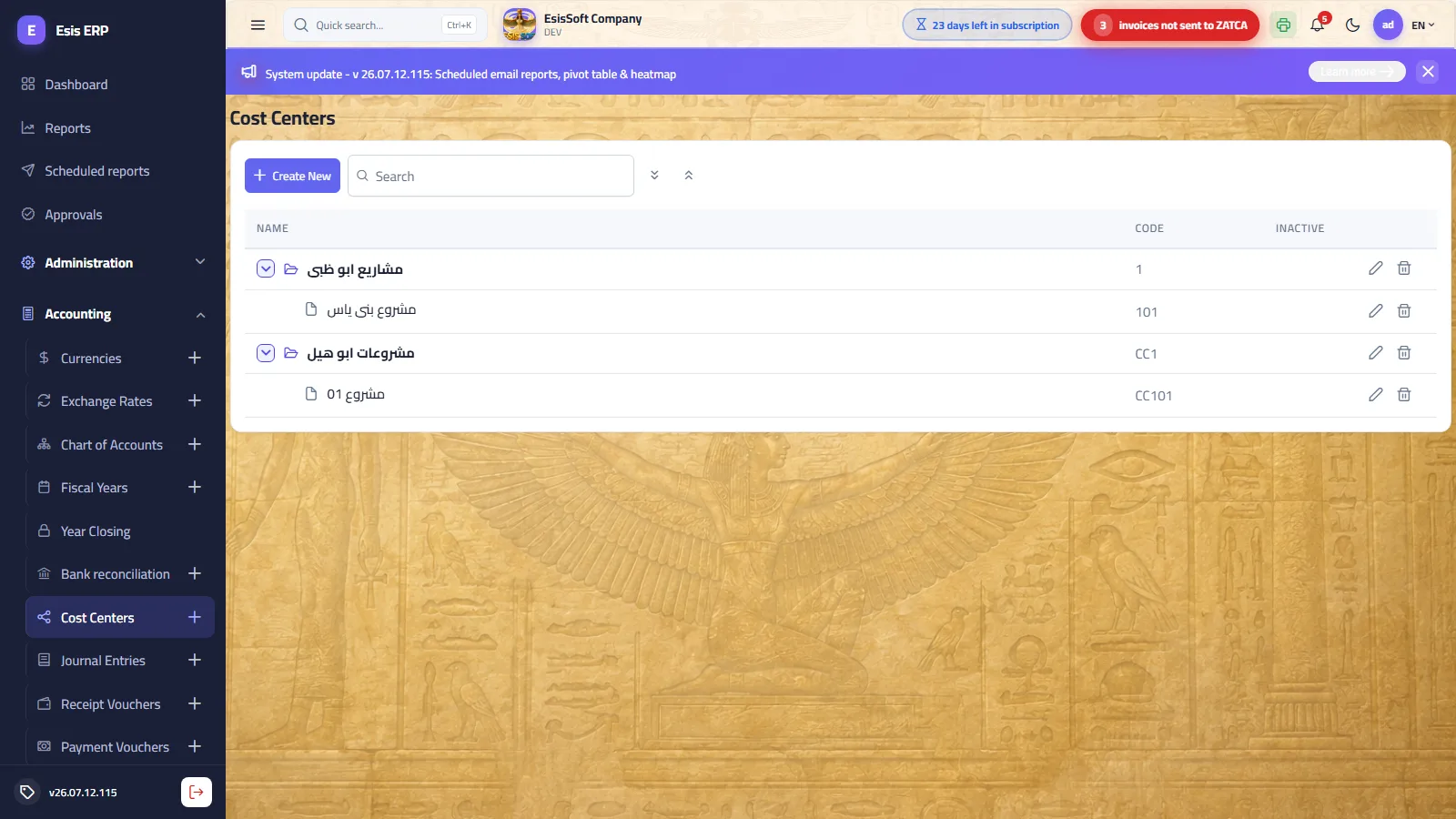
Purpose: an analytical dimension for entries: distribute revenues and expenses across departments, projects or activities — a hierarchical tree exactly like the chart of accounts. In this product cost centers double as projects: use one tree for both.
Fields (add / edit page)
| Field | Required | What to enter |
|---|---|---|
| Code | Auto | Read-only preview; regenerates the moment you pick a parent (same mechanism as the CoA). |
| Parent Cost Center | No | Empty = root. Locked in edit mode. |
| Name | Yes | e.g. “Sales department”, “Project Alpha”. |
| Active | — | Edit mode only. |
Worked example
- Create roots “Admin” and “Operations”; under Operations add “Riyadh site” and “Jeddah site”.
- In a salaries journal entry, split the expense over two lines — 12,000 on “Riyadh site” and 8,000 on “Jeddah site” — same account, different cost centers.
- The cost-center reports now show each site's cost independently.
Validation & common errors
| Message | Cause / what to do |
|---|---|
| “Cost center code 'X' already exists.” | Save again — the next code is re-generated. |
| “'X' has child cost centers and cannot be deleted.” | Remove children first. |
| “'X' has journal entry lines and cannot be deleted.” | Deactivate instead of deleting. |
FAQ
Is a cost center mandatory on entry lines?
No — it is optional per line. Leave it empty for balance-sheet movements and fill it on revenue/expense lines you want analyzed.
Where do I define projects?
Right here — create a “Projects” root and add each project under it.
Journal entries
Route: Accounting › Journal Entries — /accounting/journal-entries
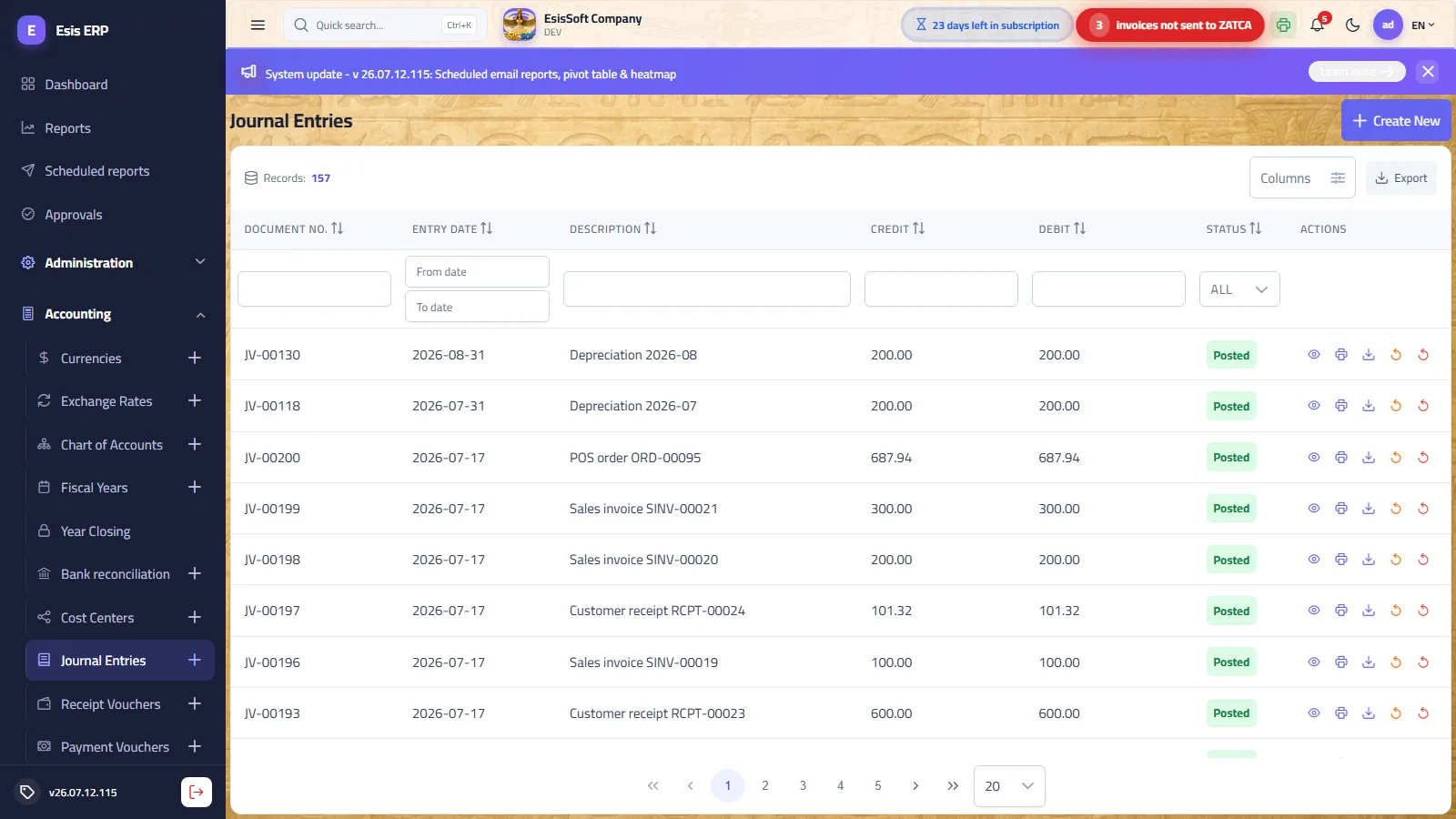
Purpose: the register of all entries — manual ones and those generated by documents (invoices, vouchers, cheques, closing…), each carrying its journal type (Manual / Automatic / Opening / Closing / Adjustment / Reversal) and source module.
Statuses
| Status | Meaning |
|---|---|
| Draft | Saved but not affecting balances. Editable and deletable. |
| Posted | Affects account balances. Read-only. |
| Unposted | Was posted, then withdrawn. Balances no longer affected; can be posted again. |
| Reversed | Cancelled by an equal-and-opposite reversal entry; both stay in the register. |
List row actions & permissions
| Action | Available when | Permission |
|---|---|---|
| View (eye) | Always | GL.JournalEntries.View |
| Post (✓) | Draft or Unposted | GL.JournalEntries.Post |
| Print / Download | Posted | — |
| Unpost (↺) | Posted | GL.JournalEntries.Unpost |
| Reverse | Posted (asks for confirmation) | GL.JournalEntries.Post |
| Delete | Draft only | GL.JournalEntries.Delete |
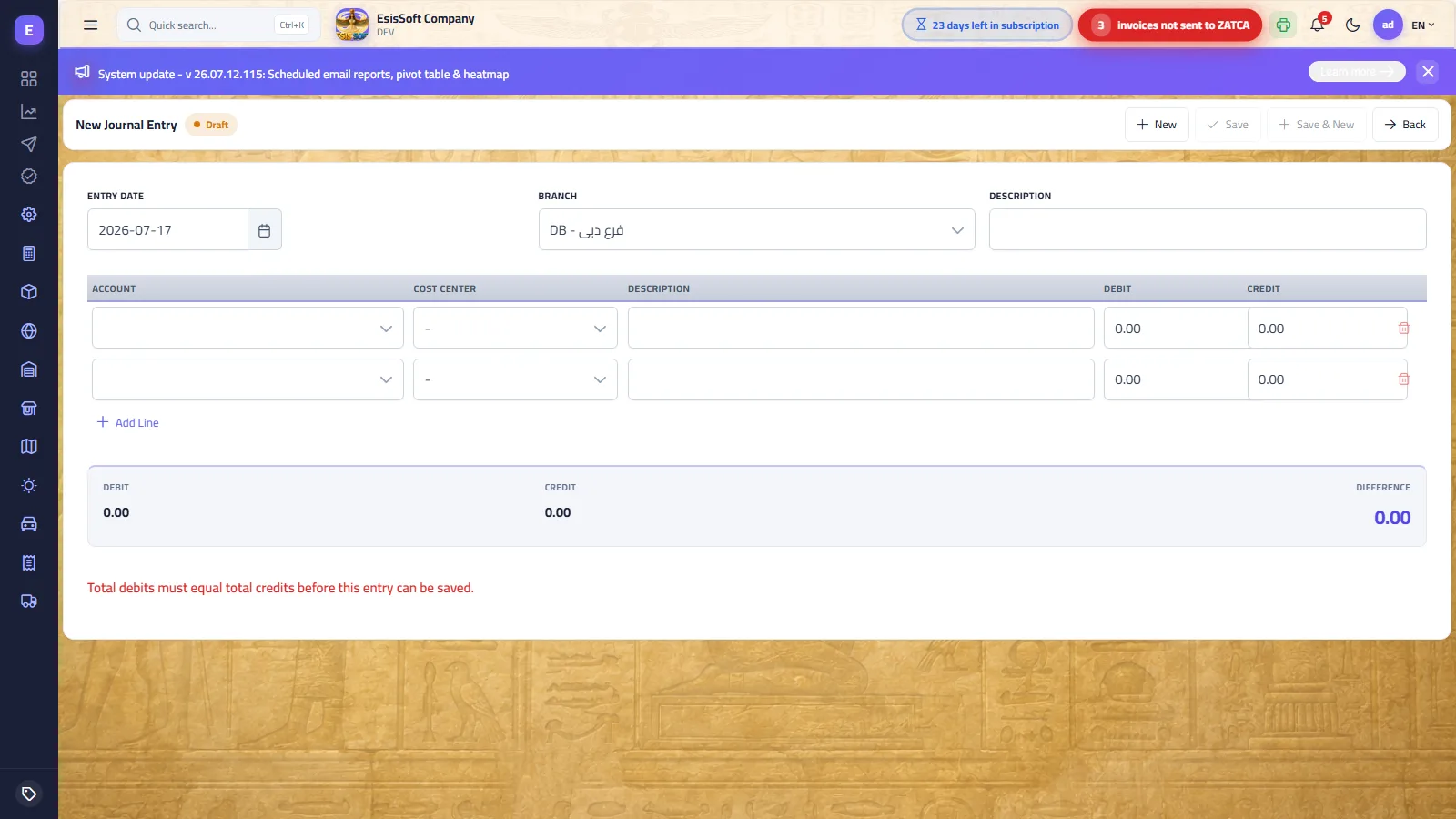
The editor
| Field | Required | What to enter |
|---|---|---|
| Entry Date | Yes | Defaults to today. Must fall inside an open accounting period. |
| Branch | Preset | Defaults to your default branch (else the main branch); locked when you are scoped to a single branch. |
| Description | No | The entry's narrative. |
| Line grid (starts with two lines; a line can be removed only while more than two remain) | ||
| Account | Yes (per line) | Searchable “code - name” dropdown; only leaf accounts are listed. |
| Cost Center | No | Optional analytical dimension per line. |
| Description | No | Line-level narrative. |
| Debit / Credit | One of them | Entering a debit zeroes the credit on that line and vice versa — a line is one-sided. |
- Keyboard flow: Enter walks from cell to cell through the grid, and from the last cell of the last row it adds a fresh line and jumps into it. Enter never submits the form — the Save button does.
- Totals strip: Debit, Credit and Difference. The difference stays red until the entry balances; the warning “Total debits must equal total credits before this entry can be saved.” shows beneath.
- Toolbar: New (fresh entry with the next number), Save, Save & New (keeps date and branch for rapid sequential entry), Back. Save is disabled until the entry is balanced, has ≥ 2 lines and every line has an account. Once posted, the toolbar shows Print preview / Download instead.
Worked example — a balanced 3-line entry
Paying January salaries of 8,000: 5,000 from the cash box now, 3,000 payable later.
| Account | Description | Debit | Credit |
|---|---|---|---|
| 5101 - Salaries expense | January salaries | 8,000.00 | |
| 1101 - Cash on hand | Paid in cash | 5,000.00 | |
| 2105 - Accrued salaries | Balance due | 3,000.00 | |
| Totals | 8,000.00 | 8,000.00 | |
Difference = 0.00 → Save (Draft), then Post from the list. Only after posting do the three account balances change.
Validation & common errors
| Message | Cause / what to do |
|---|---|
| “Each line must have either a debit or a credit amount, never both or neither.” | One-sided lines only. |
| “A journal entry needs at least two lines.” / “Total debits must equal total credits.” | The double-entry basics — enforced both in the browser and on the server. |
| “Cannot post into a closed accounting period.” | The entry date falls in a locked period — reopen it (Year Closing) or change the date. |
| “'X' does not allow posting.” | A line uses a header account. |
| “Only a draft journal entry can be edited.” / “'JV-…' is not a draft and cannot be deleted.” | Unpost it first (if permitted) or reverse it. |
| “Cannot unpost an entry in a closed accounting period - reopen the period first.” | Unposting also respects period locks. |
FAQ
How do I correct a posted entry?
Two ways: Unpost → edit → post again (needs the Unpost permission and an open period — the entry keeps its number), or Reverse, which posts an equal-and-opposite entry and marks the original Reversed — the audit-friendly way for closed months.
What's the difference between Unposted and Reversed?
Unposted removes the effect and lets you re-edit the same entry. Reversed keeps both entries in the ledger forever, netting to zero.
Why is Save greyed out?
The entry is not balanced yet, has fewer than two lines, or a line is missing its account — check the red difference in the totals strip.
Receipt vouchers
Route: Accounting › Receipt Vouchers — /commercial/customer-payments
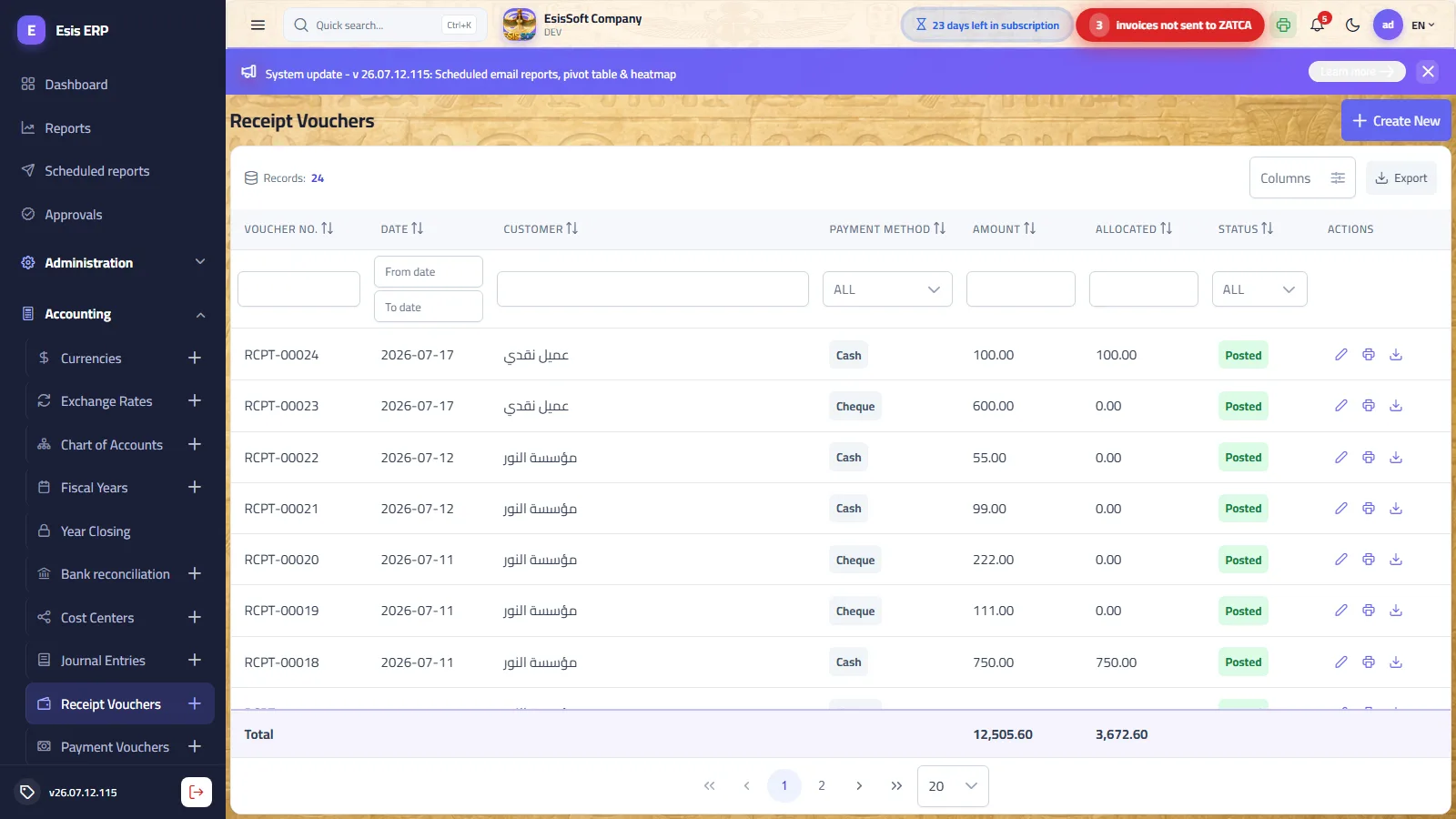
Purpose: record money collected from customers (cash, bank transfer or cheque) and allocate it to their open posted invoices. The list shows voucher no., date, customer, payment method, amount, allocated amount and status (Draft / Posted) with per-row edit, print/download (posted) and delete (draft).
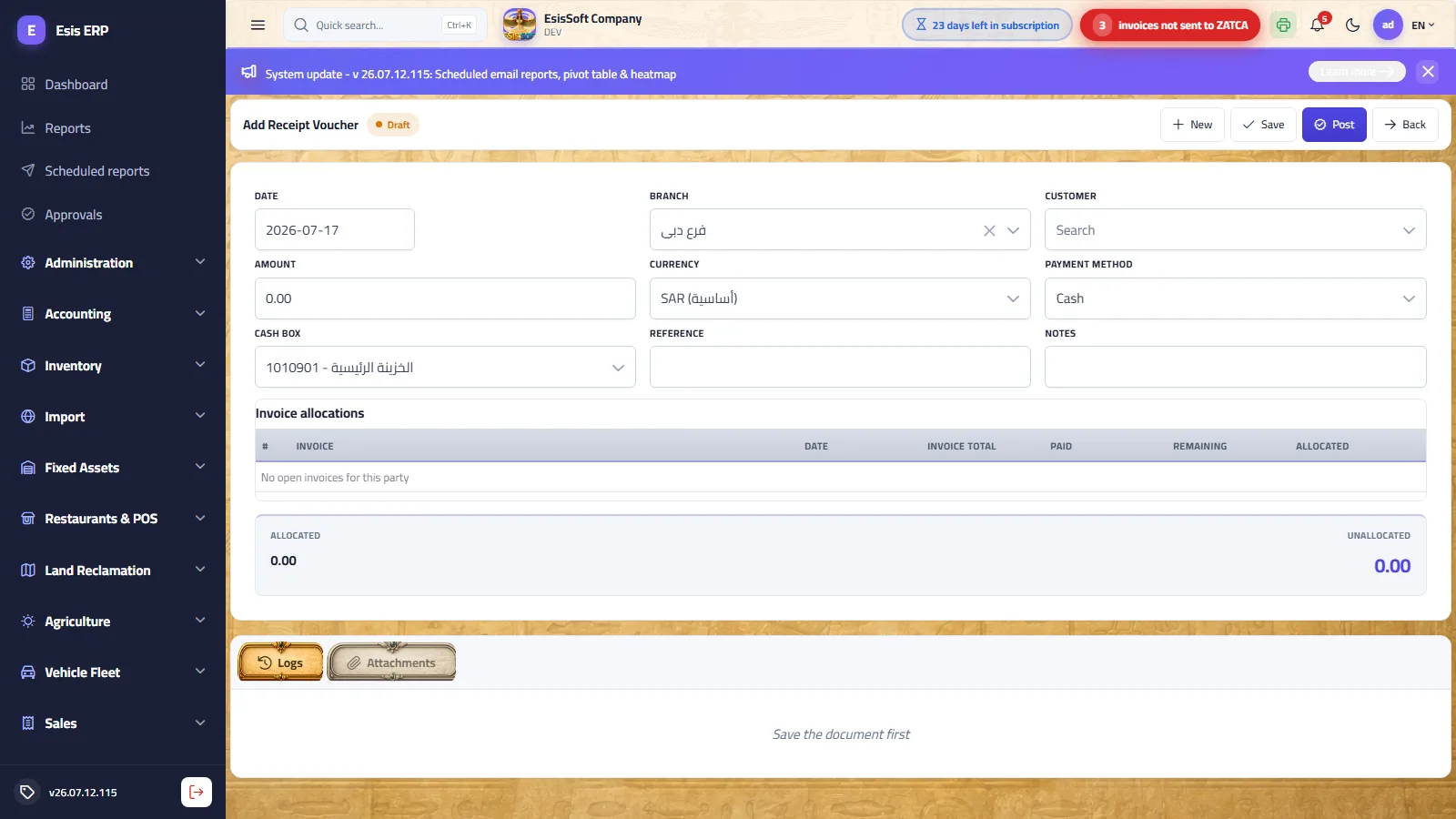
Fields
| Field | Required | What to enter |
|---|---|---|
| Date | Yes | Voucher date (defaults to today); must be inside an open period at posting time. |
| Branch | Preset | Your default branch; locked for single-branch users. |
| Customer | Yes | Searchable dropdown. Picking one loads the customer balance and the open-invoice grid. |
| Amount | Yes (> 0) | The amount received. |
| Currency / Rate | Preset | Currency picker + exchange rate (latest effective rate, editable). |
| Payment method | Yes | Cash → pick the receiving cash box; Bank transfer → pick the bank; Cheque → cheque fields appear instead. |
| Cheque No. / Drawn Bank / Due Date | Cheque only | Cheque number and due date are mandatory for a cheque voucher; the drawn bank is the customer's bank. |
| Reference / Notes | No | Free text (transfer reference, remarks). |
Cash boxes and banks are the child accounts of the parent accounts configured in Settings — keep those trees tidy and the pickers stay tidy.
Allocation grid
One row per open posted invoice: invoice no., date, total, paid, remaining, and an editable Allocated amount capped at the invoice's remaining balance. Auto-allocate spreads the voucher amount oldest-invoice-first (FIFO). The totals strip shows Allocated and Unallocated — any unallocated remainder simply stays on the customer's account (an on-account receipt is perfectly valid).
Toolbar
- Draft: New, Save (stays a draft), Post, Back.
- Posted (read-only): Print, Download, View entry (opens the generated journal entry), Back.
Worked example — 5,000 across two invoices
Customer “Al-Amal Trading” owes INV-00012 (total 4,000, paid 800, remaining 3,200) and INV-00015 (remaining 1,500). You receive 5,000 in cash:
- Pick the customer — both invoices appear; amount = 5,000; method = Cash, cash box “Main cash box”.
- Click Auto-allocate: 3,200 to INV-00012, 1,500 to INV-00015. Allocated 4,700; unallocated 300 (stays on account).
- Post. Generated entry:
| Account | Debit | Credit |
|---|---|---|
| Main cash box | 5,000.00 | |
| Accounts receivable | 5,000.00 |
Both invoices become fully paid; the extra 300 reduces the customer's balance for the future.
Accounting effect of posting
| Method | Debit | Credit |
|---|---|---|
| Cash | Chosen cash box | Accounts receivable |
| Bank transfer | Chosen bank | Accounts receivable |
| Cheque | Notes receivable (cheques under collection) | Accounts receivable |
Validation & common errors
| Message | Cause / what to do |
|---|---|
| “Allocated total exceeds the voucher amount” | Reduce the allocations or raise the amount. |
| “Cheque number and due date are required for a cheque voucher” | Fill the cheque fields. |
| “Allocation for invoice X exceeds its remaining balance (…)” | Someone else settled part of it since you opened the screen — reload and re-allocate. |
| “Invoice X is not posted.” / “belongs to a different customer.” | Only posted invoices of the same customer are allocatable. |
| “Only a draft receipt voucher can be edited.” / “A posted receipt voucher cannot be deleted.” | Posted vouchers are immutable. |
FAQ
Must the whole amount be allocated?
No — the unallocated part is kept on the customer's account and can be allocated by a later voucher.
How do I undo a posted receipt voucher?
There is no unpost here — reverse its journal entry from the Journal Entries list (Reverse) and record a corrected voucher.
Where do I see the entry it created?
Open the posted voucher and click View entry, or find it in Journal Entries tagged with its source.
Payment vouchers
Route: Accounting › Payment Vouchers — /commercial/supplier-payments
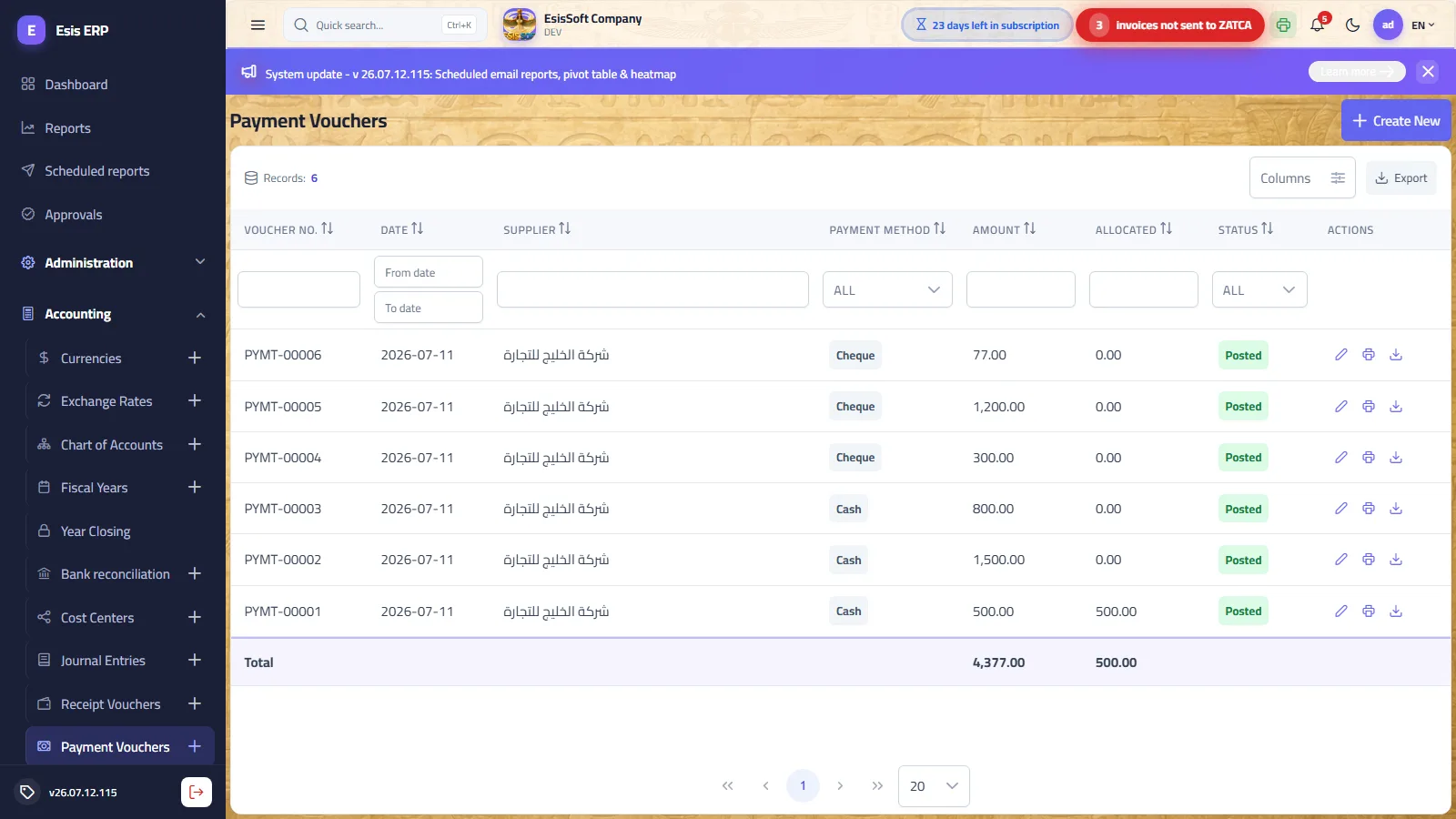
Purpose: the exact mirror of receipt vouchers, for money going out: settle supplier dues in cash, by bank transfer or by an issued cheque, allocated over the supplier's open posted purchase invoices. The editor has the same fields (date, branch, supplier + balance, amount, currency/rate, payment method, cheque fields, reference, notes), the same allocation grid with Auto-allocate, and the same Draft → Post lifecycle with print/download and “View entry” once posted.
Accounting effect of posting
| Method | Debit | Credit |
|---|---|---|
| Cash | Accounts payable | Chosen cash box |
| Bank transfer | Accounts payable | Chosen bank |
| Cheque | Accounts payable | Notes payable (cheques payable) |
A cheque payment voucher creates an Issued cheque in the Cheques screen; the bank is only credited later when the cheque clears. Vouchers that settle an import file post against the import cost-accrual account instead of accounts payable.
Worked example
- Supplier “Modern Supplies” has PI-00031 remaining 7,500. Create a payment voucher, amount 7,500, method Bank transfer, bank “Riyad Bank”.
- Auto-allocate → 7,500 on PI-00031. Post.
- Entry: Dr Accounts payable 7,500 / Cr Riyad Bank 7,500 — the invoice is now settled.
FAQ
Can I pay an advance with no open invoice?
Yes — post the voucher with no allocations; the amount sits on the supplier's account until invoices arrive.
Why hasn't my bank balance moved after a cheque voucher?
By design: the credit goes to cheques payable. The bank is hit when you mark the cheque Cleared on the Cheques screen.
Cheques
Route: Accounting › Cheques — /commercial/cheques
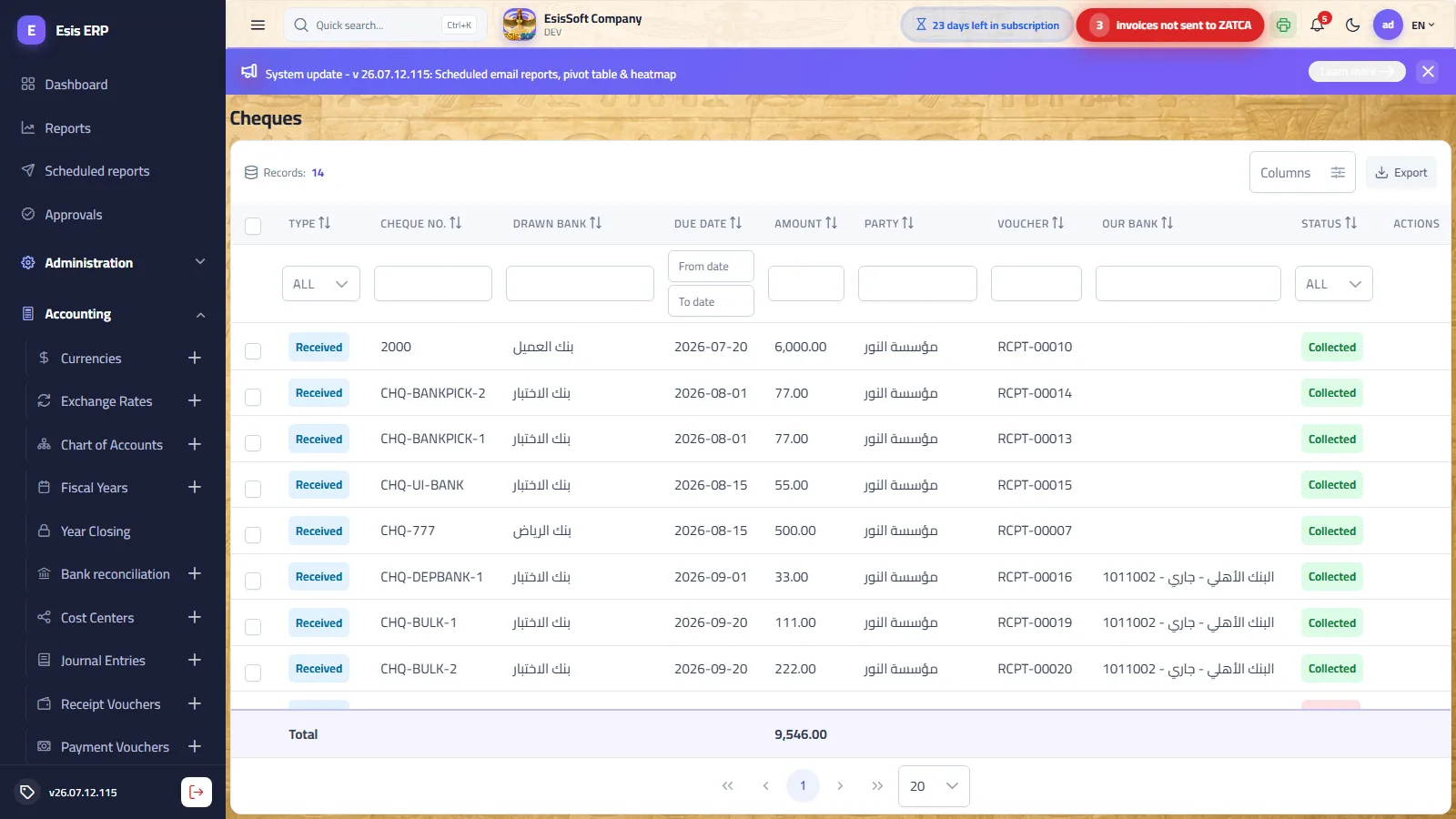
Purpose: track every cheque's lifecycle. Cheques are born automatically when a cheque voucher is posted — received cheques from receipt vouchers, issued cheques from payment vouchers. Columns: type (Received / Issued), cheque no., drawn bank, due date, amount, party, source voucher, our bank (chosen at deposit/collection) and status. Rows are checkbox-selectable for bulk steps, and the dashboard's cheque KPIs deep-link here pre-filtered by status.
Received-cheque lifecycle
| Step | From status → to | Accounting effect |
|---|---|---|
| Deposit | Portfolio → Deposited | None — status only. You pick our bank; it is remembered as the default for collection. |
| Collect | Portfolio or Deposited → Collected | Dr Bank / Cr Notes receivable — the money finally lands in the bank. |
| Bounce | Portfolio or Deposited → Bounced | Dr Accounts receivable / Cr Notes receivable — the customer owes again. |
Issued-cheque lifecycle
| Step | From status → to | Accounting effect |
|---|---|---|
| Clear | Issued → Cleared | Dr Notes payable / Cr Bank — the bank debits your issued cheque. |
| Cancel | Issued → Cancelled | Dr Notes payable / Cr Accounts payable — the debt returns to the supplier's account. |
- The bank steps (Deposit / Collect / Clear) open a small dialog to pick which bank; one pick covers the whole selected batch, defaulting to the deposit-time bank.
- Bulk bar: select several cheques — only the steps valid for every selected cheque are offered. Each cheque transitions independently; a partial-failure toast reports “X of Y cheques failed”.
- Permissions: viewing needs
COMM.Cheques.View; every step needsCOMM.Cheques.Manage.
Worked example — received cheque, receipt to collection
- Receipt voucher RCPT-00027, method Cheque, no. 100234, due 2026-08-01, amount 12,000 → on posting: Dr Notes receivable / Cr AR 12,000 and cheque 100234 appears as Portfolio.
- You lodge it: Deposit, pick “Riyad Bank” → Deposited (no entry).
- On 2026-08-01 the bank confirms: Collect → Dr Riyad Bank 12,000 / Cr Notes receivable 12,000 → Collected.
- Had it bounced: Bounce → Dr AR 12,000 / Cr Notes receivable 12,000 → chase the customer again.
Validation & common errors
| Message | Cause / what to do |
|---|---|
| “Cheque 100234 is Collected — 'Collect' is not a valid step from here.” | Each status allows specific next steps only (see the tables above). |
| “X of Y cheques failed” | Some cheques in the bulk batch were in the wrong status — the rest went through; reload and review. |
FAQ
Can I collect without depositing first?
Yes — Collect works straight from Portfolio; the dialog asks for the bank then.
A bounced cheque was paid later in cash — what now?
The bounce already restored the customer's debt, so just record a normal cash receipt voucher.
Why can't I edit a cheque's amount?
Cheques mirror their source voucher. Fix the voucher (reverse/correct) — the register is not directly editable.
Bank reconciliation
Route: Accounting › Bank Reconciliation — /accounting/bank-statements
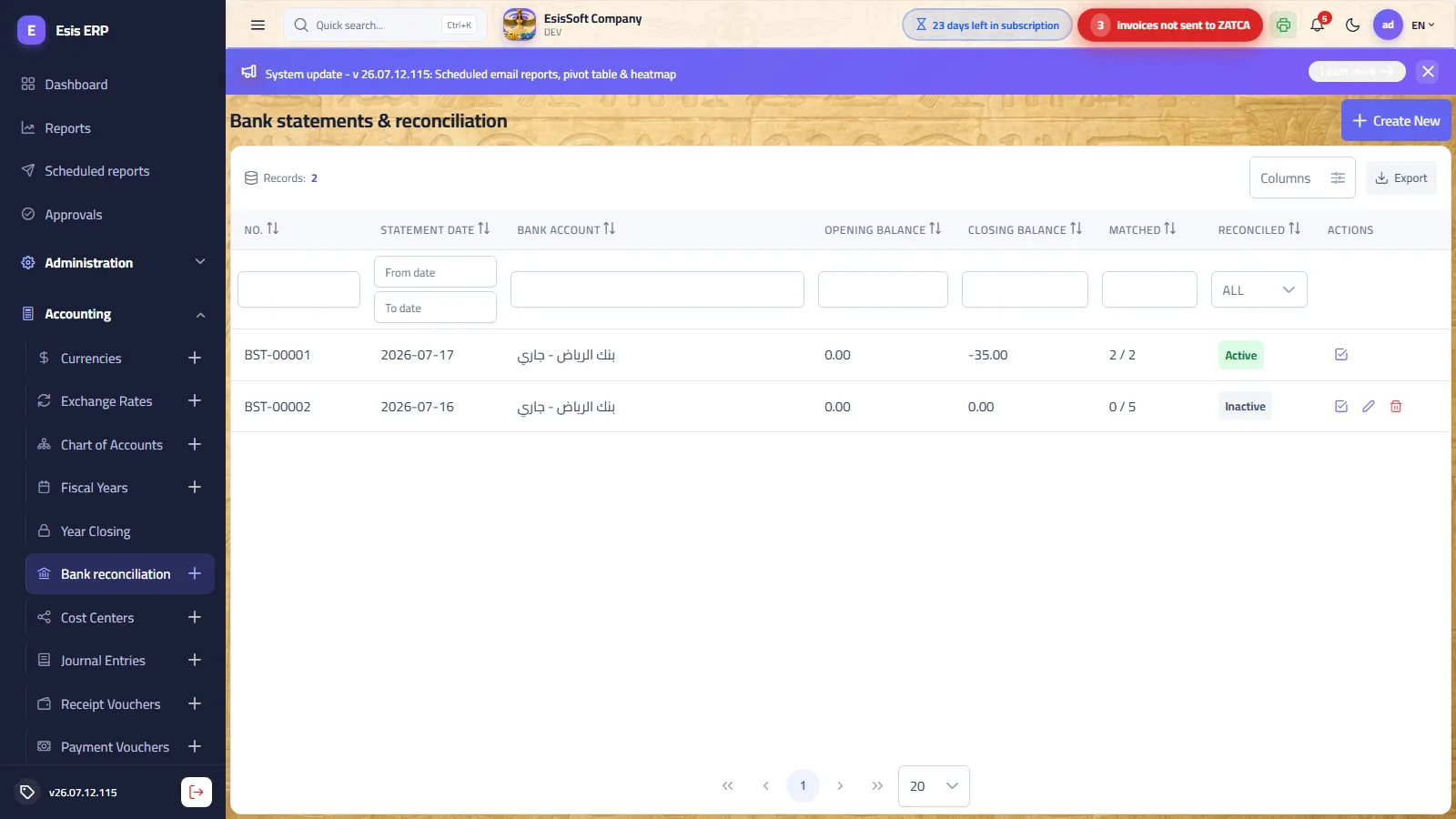
Purpose: match your book records of a bank account against the actual bank statement. The list shows one row per captured statement: no., statement date, bank account, opening/closing balances, matched x / y lines and a reconciled flag. Row actions: open reconciliation; edit and delete are offered only while unreconciled. Permissions: GL.BankReconciliation.View to read, GL.BankReconciliation.Manage to change anything.
1 — Capture the statement
| Field | Required | What to enter |
|---|---|---|
| Bank account | Yes | One of your bank accounts (children of the configured bank parent). |
| Statement date | Yes | The period-end date of the statement. |
| Opening / Closing balance | Yes | Exactly as printed on the bank's statement. |
| Notes | No | Free text. |
| Movements | ≥ 1 line | Date, description, reference, deposit, withdrawal — typed manually (New line) or via Import statement file (CSV). |
CSV import: columns date, description, reference, deposit, withdrawal — or the 3-column form date, description, signed amount. Delimiter comma, semicolon or tab; dates yyyy-MM-dd or dd/MM/yyyy; header rows are skipped automatically. The footer shows the closing computed from lines (opening + deposits − withdrawals) so you can spot capture errors against the bank's printed closing before saving.
2 — The reconciliation workspace
- A KPI strip: bank account, statement closing balance, book balance, difference (closing − book) and the count of unmatched lines.
- Two panes: unmatched bank statement lines vs unmatched posted book movements (journal lines on that bank account). Click one on each side and hit Match selected pair — amounts must agree (to the cent) or the “Amounts do not match” warning shows.
- Auto-match sweeps all exact amount + direction matches in one click and reports how many it paired.
- A Matched section lists paired lines with an Unmatch button while still open.
- Confirm reconciliation is enabled only when every statement line is matched; it locks the statement. Reopen unlocks it.
Worked example — a matching session
- June statement for “Riyad Bank”: opening 10,000, closing 18,450, lines: +5,000 (customer transfer), +4,000 (cheque collected), −550 (bank fees).
- Open the workspace. Auto-match pairs the 5,000 and 4,000 with their posted vouchers instantly.
- The 550 fee exists only at the bank. Record a manual journal entry Dr Bank charges 550 / Cr Riyad Bank 550, post it, return — it now appears on the book side; match it.
- All lines matched, difference 0.00 → Confirm reconciliation. The statement is locked as your audit trail for June.
Validation & common errors
| Rule | Meaning |
|---|---|
| A statement needs at least one line; each line carries exactly one positive amount (deposit or withdrawal). | Fix the CSV or the typed line. |
| Only posted journal lines on the same bank account can be matched; a book line matches only once. | Post your drafts first; pick the right account. |
| A reconciled statement cannot be edited or deleted — reopen it first. Replacing lines is blocked while matches exist. | Unmatch, then edit. |
| “Cannot confirm — N lines unmatched.” | Every statement line must be matched (create entries for bank-only items like fees). |
FAQ
The difference is not zero although everything matched — why?
The difference compares the bank's closing balance to your book balance as of the statement date. Timing items (e.g. a cheque issued but not yet cleared) legitimately explain a remainder; the lock only requires all statement lines matched.
Where do bank fees and commissions go?
They exist only on the statement, so record a manual journal entry against the bank account and match it — the workspace never creates entries by itself.
Can I reconcile the same account twice for one month?
Each statement is its own document; capture consecutive statements and reconcile each in turn.
Year closing
Route: Accounting › Year Closing — /accounting/year-closing
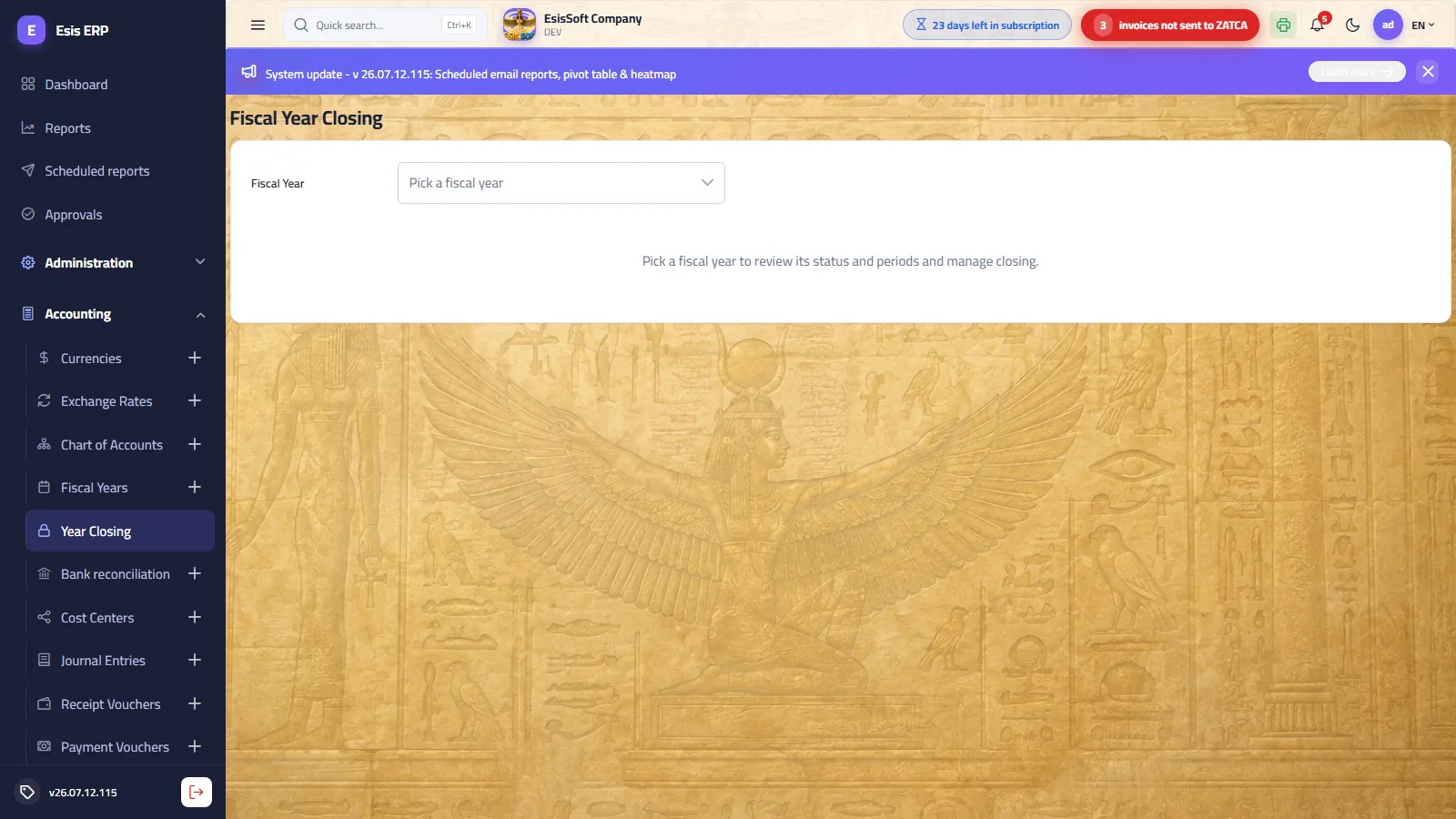
Purpose: the only place where a fiscal year's — and its periods' — open/closed status changes. Pick a year from the dropdown (each option shows its status) and the screen presents: the year's status tag, a “closed periods x / y” counter, a Close Year / Reopen Year button, and the full period table with a per-period Close / Reopen action. Every change asks for explicit confirmation. Permission: GL.YearClosing.Edit.
What closing does
- Close a period after reviewing its month: any posting (or unposting) dated inside it is rejected from that moment — the standard monthly-close discipline.
- Close the year at year end: the year and all of its periods are marked closed in one step, and no document can post into it.
- Reopen reverses either — reopening a period requires the year itself to be open first.
Recommended monthly routine
- Post all drafts dated in the month (journal entries, vouchers, invoices).
- Reconcile the month's bank statements.
- Review the trial balance for the month.
- Close the period here — later corrections go into the next open period.
Validation & common errors
| Message | Cause / what to do |
|---|---|
| “Cannot post into a closed accounting period.” | Shown on any document whose date falls in a closed period — reopen the period or redate the document. |
| “Period N is already closed.” / “Period N is not closed.” | The status already matches what you asked for. |
| “Reopen the fiscal year before reopening one of its periods.” | Year lock outranks period locks. |
| “Fiscal year 'X' is already closed.” / “is not closed.” | Same idempotence checks at year level. |
The closing wizard — five steps
Closing is not only locking: the year’s net result is carried to retained earnings, and the asset, liability and equity balances are carried into the next year. The wizard does that and shows you every step before it runs.
- Pick the year — one marked with a tick is already closed.
- Checks — the year’s readiness: ⛔ blocks you, ⚠️ is for information. “All checks clear” means it is ready.
- Review the result — total revenue and expense, the net profit or loss, and the retained-earnings account that receives it.
- Confirm — what the system will do, written out: a closing entry zeroing revenue and expense, an opening entry for the next year with the asset, liability and equity balances, and the lock on the year and all its periods.
- Done — and from there you close another year.
FAQ
Why can't I post in January?
The January period (or the whole year) is closed — this screen shows exactly which, and the counter tells you how many periods are locked.
Does closing the year post a closing entry?
Yes — the wizard posts the closing entry and the next year’s opening entry together, and locks the year. If you want only the lock, close the periods from the table below instead of running the wizard.
Who can reopen a closed year?
Only users granted GL.YearClosing.Edit — typically the system administrator or chief accountant.
Cash transfers
Path: Accounting → Cash transfers — /accounting/transfers
What it does: Moving money between your tills and banks on a single document instead of a hand-written entry that gets one side wrong: till to bank, bank to bank, or between two tills.
| Field | Description |
|---|---|
| Transfer kind | From a till or a bank → to a till or a bank. |
| From / to | The two accounts — transferring an account to itself is refused. |
| Amount and date | The value and the day. |
| Branch and description | The branch and how it reads in the entry. |
| Entry number | The journal entry raised — where you check the movement in the books. |
Bulk document posting
Path: Accounting → Document posting — /accounting/document-posting
What it does: The accountant’s end-of-day screen: pick a document type and a date range, see the unposted drafts, tick them and post the lot in one go instead of opening each one.
| Field | Description |
|---|---|
| Document type | Invoices, vouchers or notes — one type at a time. |
| From / to date | The range of drafts shown. |
| Selected and total | How many documents and how much, before you press. |
| Awaiting approval | A document inside an approval cycle is not posted until it completes. |
| Result | Posted, or «so many posted, so many failed» — a failure stays a draft with its reason. |
Foreign-currency revaluation
Path: Accounting → FX revaluation — /accounting/fx-revaluation
What it does: Your monetary balances in foreign currency are restated at the closing rate as of a date you choose, and the difference is an exchange gain or loss posted as an adjusting entry. The month-end step without which the balance sheet keeps stale rates.
| Field | Description |
|---|---|
| As of date | The revaluation date — and what selects the closing rate. |
| Foreign balance and carrying value | What you hold in the currency, and its recorded value. |
| Closing rate and revalued value | The rate applied and the new value. |
| Difference and net adjustment | The exchange gain or loss. |
| FX difference account | The account that receives the difference — set in settings. |
Moving an account’s activity
Path: Accounting → Move account activity — /accounting/account-move
What it does: An account used by mistake, or an account with activity that you now want as a parent: a five-step wizard moves its activity elsewhere — it checks first, shows what will move, then executes; the operation is logged and can be reverted.
| Field | Description |
|---|---|
| 1 Source account | The account whose activity you want emptied. |
| 2 Destination | A postable child account; or under a parent, choosing or creating a child; or parked in a temporary account so the source can become a parent. |
| 3 Check | What will move and what blocks it — closed periods, unposted lines, settings still pointing at the account. Nothing has run yet. |
| 4 Review | Line count, entry amount and date before executing. |
| 5 Execute | Runs and is written to the operations log. |
Opening balances
Path: Accounting → Opening balances — /accounting/opening-balances
What it does: Your accounts’ balances on the day you started on the system are entered here in one grid — debit and credit — rather than typed as a journal entry that forgets an account. The grid does not save until it balances.
| Field | Description |
|---|---|
| Fiscal year | Chosen first — and the balances belong to the first year alone. |
| Branch | A balance per branch, or “no branch (general)”. |
| Entry date and number | The first day of the fiscal year automatically, and the opening entry’s number. |
| Search | By account code or name inside the grid. |
| Debit / credit | Each account’s balance. |
| Totals | A badge reading “balanced ✓” or “not balanced ✗”. |
Frequently asked questions
How do I create a journal entry?
Open Accounting › Journal Entries › New, pick the date and (optional) cost center, add balanced debit/credit lines, then Save. Post it to reflect it in the ledgers.
What is the difference between saving and posting?
Saving keeps a draft you can still edit or delete; posting commits the entry to the general ledger. A posted entry can only be reversed, not deleted, to preserve the audit trail.
How does the chart of accounts work?
It is a tree of accounts seeded from your business activity. You can add child accounts, but posting is only allowed on leaf (non-group) accounts.
Which permissions are needed for accounting?
GL permissions such as GL.JournalEntries.View/Create control access; your administrator assigns them through roles under Administration.