Land Reclamation
Track land reclamation and development projects: register land plots in a master registry, open a reclamation project with a budget on each plot, and record every expense (roads, wells, irrigation, electricity, infrastructure…). Each cost is automatically capitalized to a projects-in-progress asset account, so you always know each project's total cost and remaining budget.
Overview and workflow
When to use this module: when you own (or manage) raw land and spend money to develop it — drilling wells, building roads, laying irrigation and power networks — and you want to know exactly what each piece of land cost you before selling or using it. Spending here is not an immediate expense on the income statement; it is an investment capitalized to an asset until the project is finished.
- Register the plot in Land Plots: code, name, area in feddan, ownership and location.
- Open a reclamation project on the plot from Reclamation Projects and set its estimated budget.
- Record every expense as it happens in Project Costs — each cost posts an automatic journal entry instantly.
- Monitor the "Costs" and "Budget remaining" columns in the project list to compare actual vs. planned.
- Close the project when finished (lock button); it then stops accepting new costs.
| Permission | What it allows |
|---|---|
LAND.Plots.View / Create / Edit / Delete | View, add, edit and delete land plots. |
LAND.Projects.View / Create / Edit | View and create projects; Edit is required for the close button. |
LAND.Costs.View / Create | View project costs and record a new cost (costs cannot be edited or deleted). |
Reclamation projects
Route: Land › Reclamation Projects — /land/projects
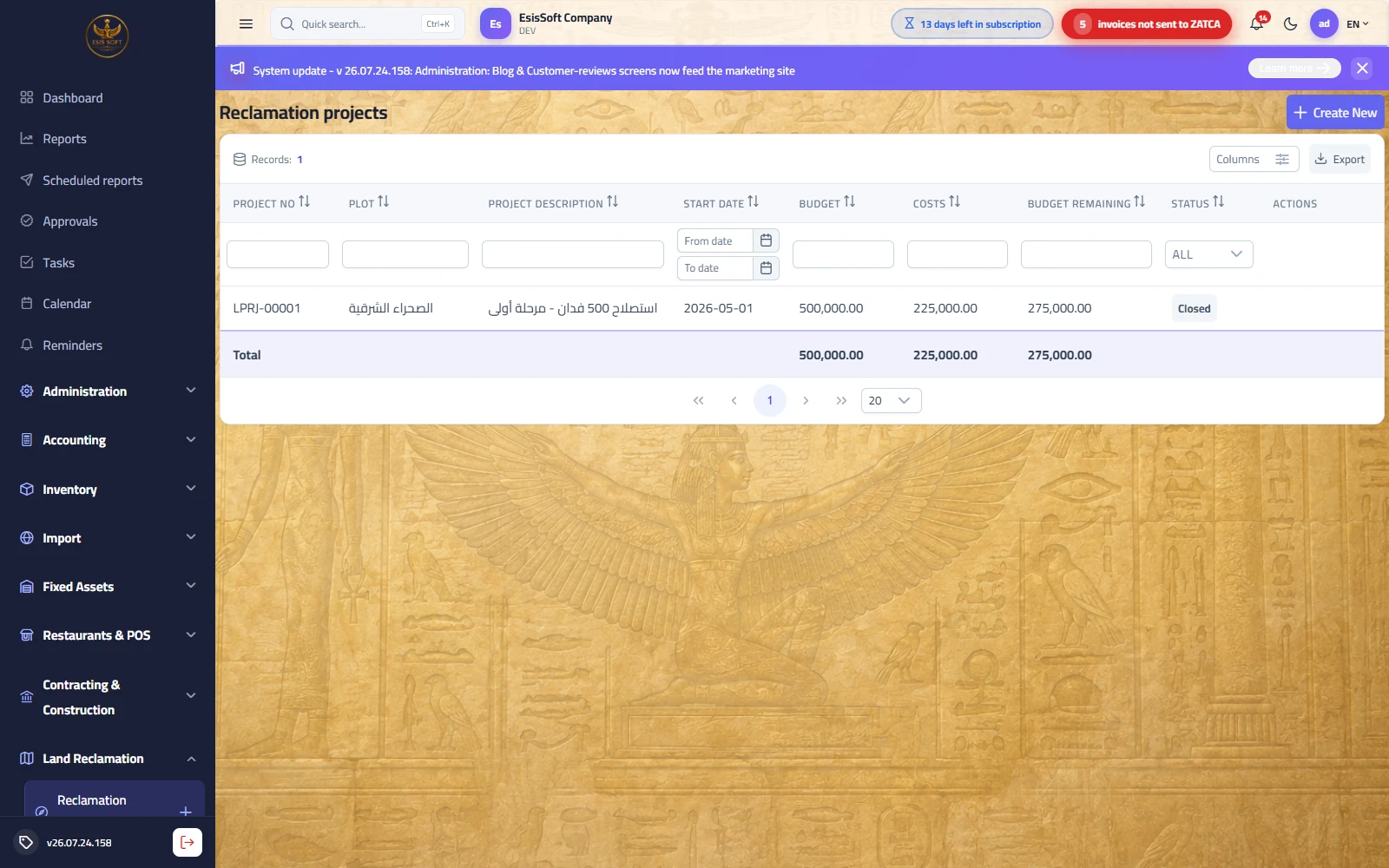
Purpose: the project is the cost container: it is opened on a specific plot with an estimated
budget, and every recorded cost accumulates on it until it is closed. It automatically receives a serial
document number in the form LPRJ-00001 and the fiscal year matching its start date.
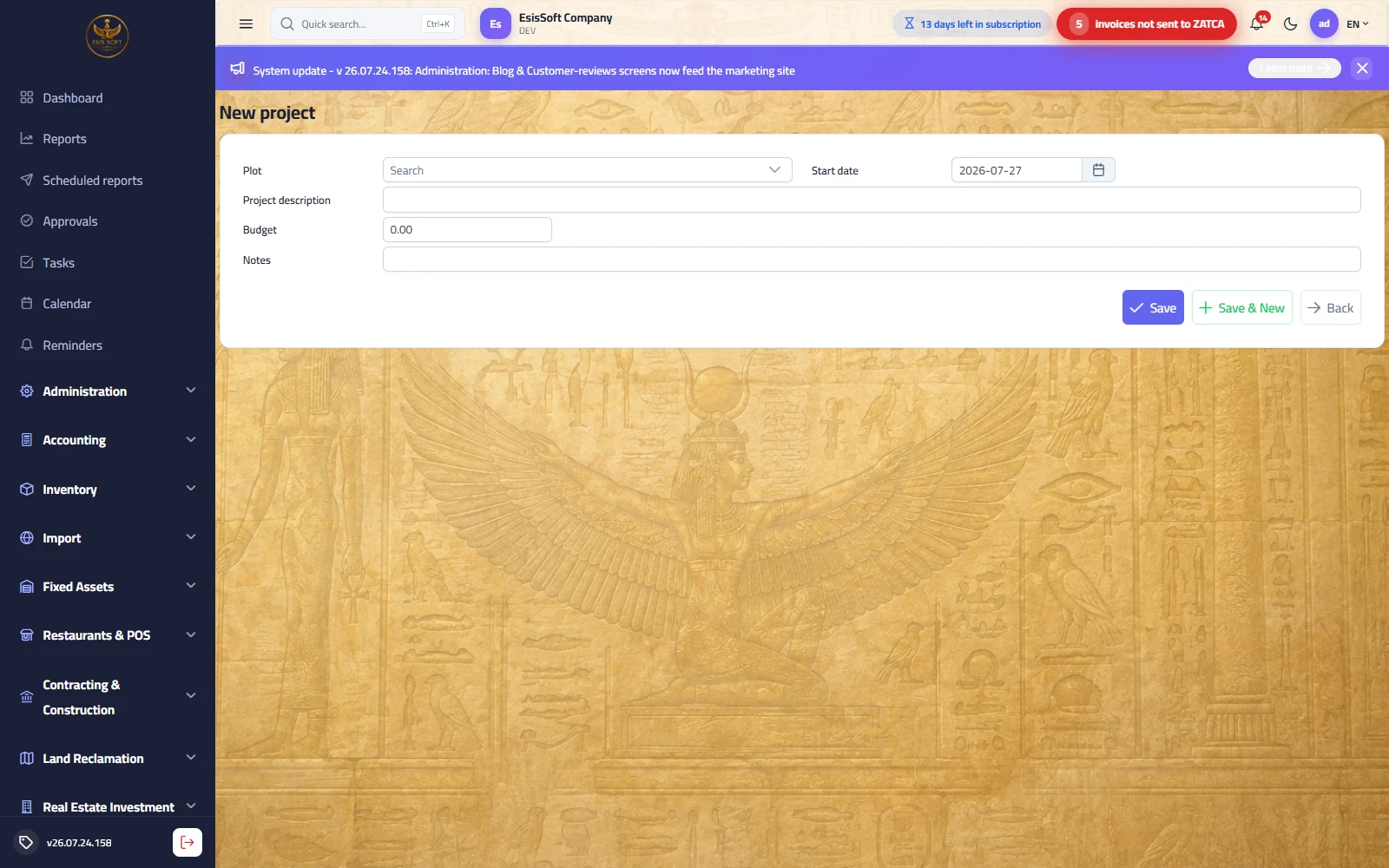
"New project" fields
| Field | Required | Description |
|---|---|---|
| Plot | Yes | Pick from the plot registry (only active plots are listed) with name search. |
| Start date | Yes | Defaults to today; determines the project's fiscal year. |
| Project description | Yes | Free text up to 300 characters, e.g. "North Farm reclamation — phase 1". |
| Budget | No (default 0) | Estimated total for the project; used to compute "Budget remaining". Overspending is not blocked. |
| Notes | No | Free notes. |
Standard action buttons: Save (returns to the list), Save & New (clears description, budget and notes for the next project), Back.
Project list columns
| Column | Meaning |
|---|---|
| Project no | The automatic number LPRJ-…. |
| Plot | Name of the linked land plot. |
| Project description / Start date | As entered. |
| Budget | Estimated budget (with a column total). |
| Costs | Total actual costs accumulated — updates automatically with every new cost. |
| Budget remaining | Budget − costs; a negative value means the budget was exceeded. |
| Status | Open accepts new costs / Closed finished. |
Closing a project
- Open the project list and locate the row (the lock icon appears only for Open projects).
- Click the lock icon in the actions column.
- The status changes to "Closed" and the end date is set to today automatically.
Common errors and situations
| Situation | Cause and fix |
|---|---|
| Save button does nothing | No plot selected or the description is empty — both are required. |
| Plot missing from the dropdown | The plot is inactive; activate it from the Land Plots screen ("Active" checkbox). |
| "Budget remaining" is negative | Not an error: actual costs exceeded the budget, and the system does not block overspending — review the project. |
FAQ
Q: Can I open more than one project on the same plot?
A: Yes; for example one project per reclamation phase. Each project has its own number, budget and costs.
Q: I closed a project by mistake — how do I reopen it?
A: There is no reopen action on the screen. Contact your system administrator; in practice the usual
remedy is to open a new project for the remaining work.
Q: Can I change the budget after creating a project?
A: The current screen offers no project editing after saving, so review the budget carefully before saving.
Project costs
Route: Land › Project Costs — /land/costs
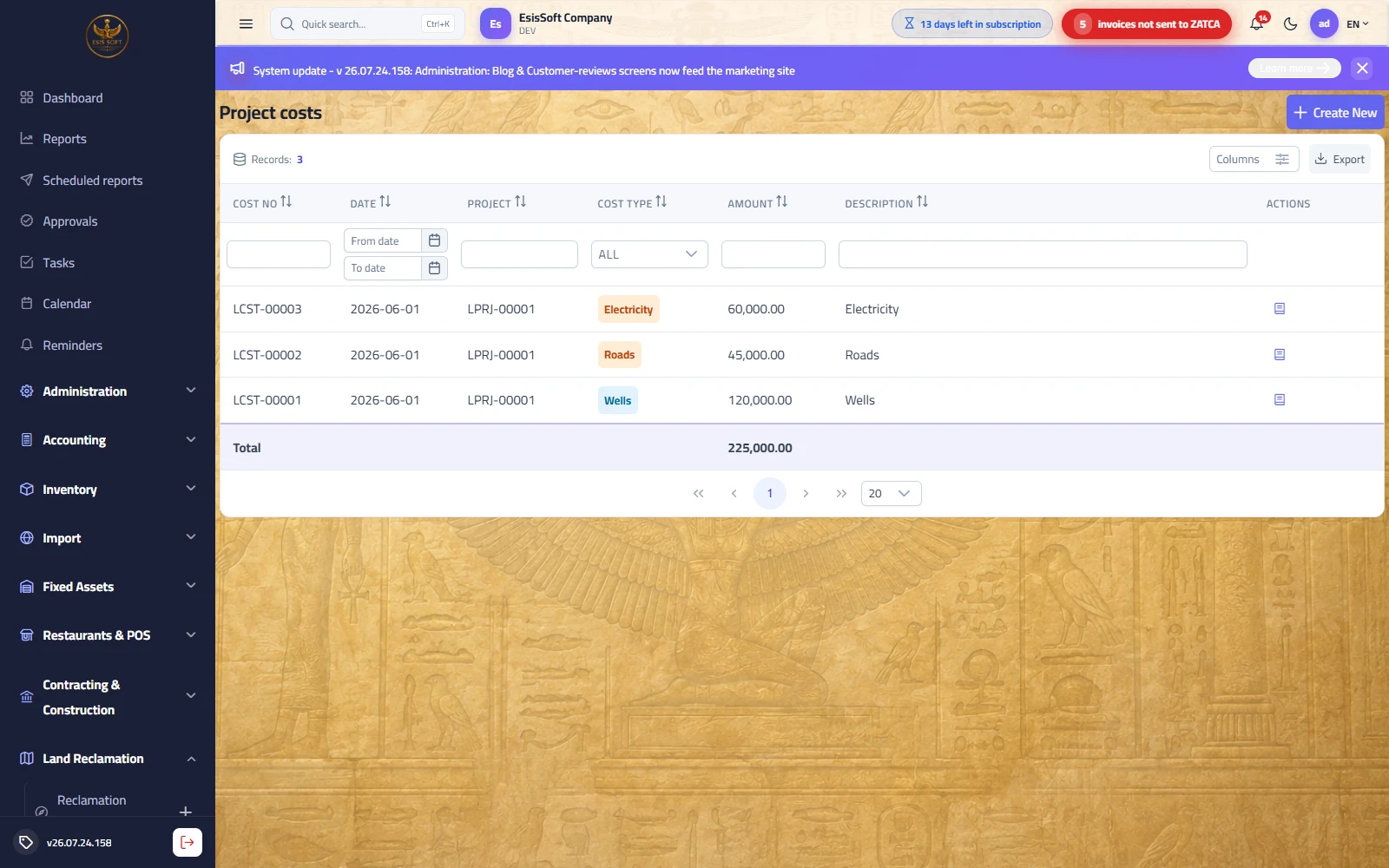
Purpose: record every expense against its project as it happens. The document receives an
automatic number in the form LCST-00001, and its journal entry is posted the moment you
save — there is no separate posting step — adding the amount directly to the project's total costs.
"New project cost" fields
| Field | Required | Description |
|---|---|---|
| Date | Yes | Date of the expense; determines the entry's fiscal year. |
| Project | Yes | Only Open projects are listed, shown as "project no - description", with search. |
| Cost type | Yes | Fixed list (table below); default "Infrastructure". |
| Amount | Yes (> 0) | Expense amount with 2 decimals; zero or negative is not accepted. |
| Cash box | Yes | The cash account being paid from; Cash-type payment accounts are listed and the first is preselected. |
| Description | No | Free text shown in the list and in the journal narration. |
Cost types
| Type | Examples |
|---|---|
| Roads | Building and grading internal roads and tracks. |
| Water | Water connections and networks. |
| Electricity | Transformers, poles, electrical wiring. |
| Wells | Drilling and equipping wells and pumps. |
| Irrigation | Drip or sprinkler irrigation networks. |
| Infrastructure | Leveling, fencing, general service structures. |
| Machinery | Renting or operating heavy equipment (excavators, loaders…). |
| Labor | Daily labor and contractor wages. |
| Other | Anything not covered above. |
Accounting effect (capitalization)
Every saved cost generates a balanced two-line automatic entry:
| Account | Debit | Credit |
|---|---|---|
Reclamation projects in progress (asset — setting Land.ProjectWipAccountCode) | Amount | — |
Chosen cash box (or default cash account Comm.CashAccountCode) | — | Amount |
Common error messages
| Message / situation | Cause and fix |
|---|---|
| Save button does nothing | No project selected or amount = 0. Complete both fields. |
| Project missing from the list | The project is closed — only Open projects are listed. |
| "Project is closed - no more costs can be added." | The project was closed before saving; record the cost on an open project. |
| "Configure Land.ProjectWipAccountCode in الحسابات settings." | The capitalization account is not configured — set it in the Accounts settings and retry. |
| "Configure Comm.CashAccountCode in الحسابات settings." | No cash box chosen and no default cash account exists — configure the setting or pick a cash box. |
| "Cash box" list is empty | No Cash-type payment accounts are defined; add them in the payment accounts settings. |
FAQ
Q: Why doesn't the expense appear on the income statement?
A: By design — the expense is capitalized to the "projects in progress" asset on the balance sheet,
and only becomes a cost on the income statement when the land is later sold or put to use.
Q: Can I pay a supplier on credit instead of a cash box?
A: The current screen supports cash payment from a cash box only. For credit purchases use the Purchasing
module, then handle the capitalization with a manual journal entry.
Q: I recorded a wrong amount — what now?
A: Costs cannot be edited or deleted. Record a reversing adjustment entry in the Accounting module and
notify your system administrator to correct the project's cost total.
Q: Is the cost deducted from the budget automatically?
A: Yes; the "Costs" and "Budget remaining" columns in the project list update as soon as each cost is saved.
Land plots
Route: Land › Land Plots — /land/plots
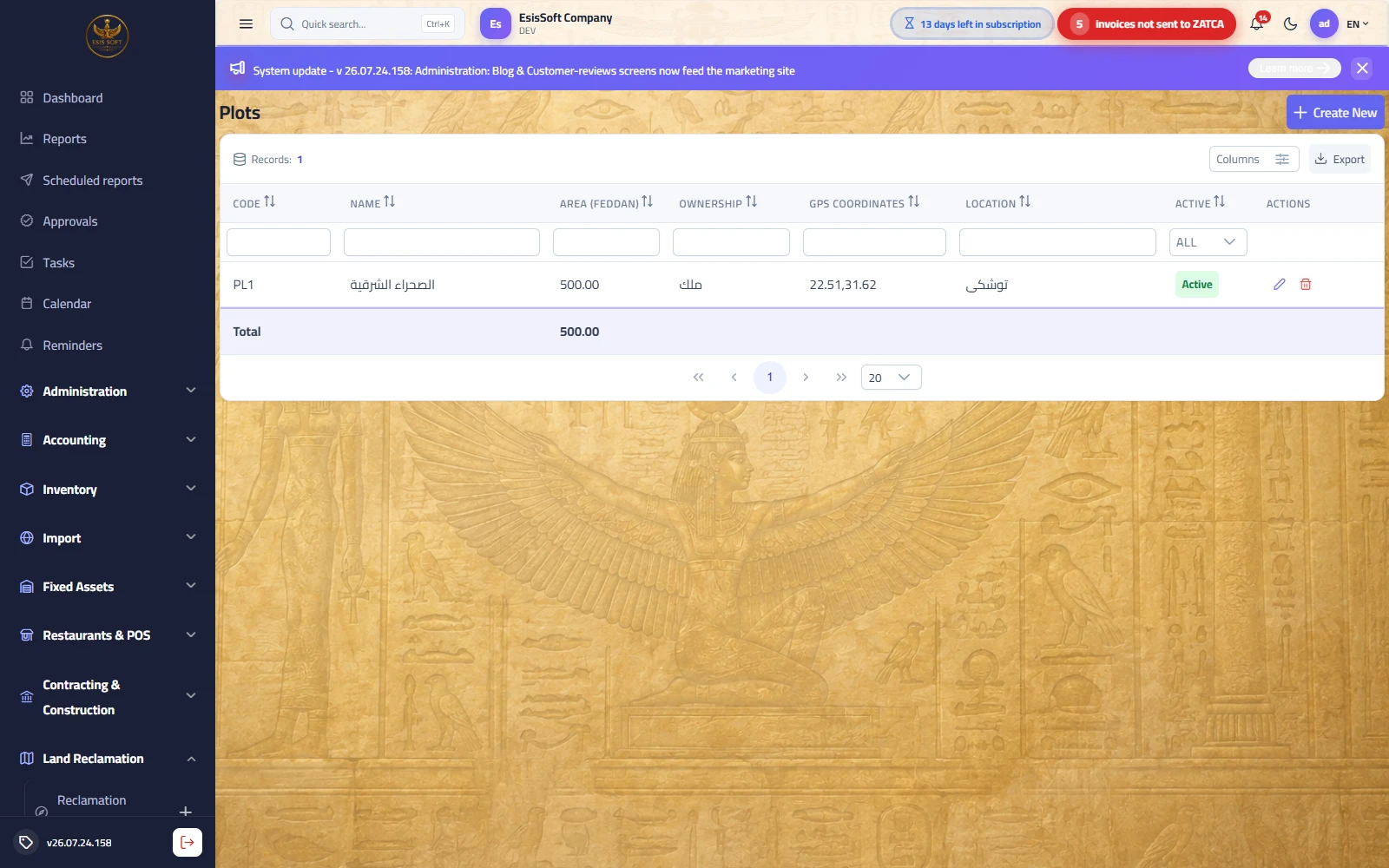
Purpose: the master registry of land plots — their fixed data: code, Arabic and English names, area in feddan, ownership, GPS coordinates and location. A plot is the prerequisite for opening a reclamation project, so register it before any project. Plots resulting from subdividing a large piece of land for sale are registered here too.
Add / edit plot fields
| Field | Required | Description |
|---|---|---|
| Code | Automatic | Generated from the code counter (read-only) and must be unique. |
| Arabic name | Yes | Up to 200 characters; the name shown in lists and pickers. |
| English name | No | If left empty it is copied from the Arabic name automatically. |
| Area (feddan) | No (default 0) | Decimal with 2 places; negative not accepted. Enter it accurately — it drives cost allocation (see the example). |
| Ownership | No | Free text: owner or deed/contract number. |
| GPS coordinates | No | In lat,lng form, e.g. 30.0444,31.2357. |
| Location | No | Textual location description (district, road…). |
| Active | — | Shown only when editing; an inactive plot disappears from the project plot picker. |
The edit screen also shows a record notes panel for dated notes on the plot (visits, inspections, documents).
List actions
| Action | Details |
|---|---|
| Edit | Opens the full edit page; all fields can be changed, including "Active". |
| Delete | After a confirmation dialog; rejected if the plot has any reclamation project. |
Common errors and situations
| Situation | Cause and fix |
|---|---|
| Save button does nothing | The Arabic name is empty — it is required. |
| "Plot code '…' already exists." | Duplicate code within the company; use the automatically generated code. |
| "Plot has projects - it cannot be deleted." | A plot with projects cannot be deleted (referential integrity); deactivate it by unchecking "Active" instead. |
FAQ
Q: Which feddan is used in the area field?
A: The Egyptian feddan (≈ 4,200 m²). What matters is consistency: use the same unit on all plots so
cost-per-feddan comparisons are valid.
Q: I subdivided a large piece of land into small sale plots — where do I register them?
A: Add each resulting plot as its own record here with its area, coordinates and deed number in the
"Ownership" field, and keep the parent plot inactive.
Q: Why doesn't my plot appear when creating a project?
A: Because it is inactive. Open it for editing and tick the "Active" checkbox.
Complete worked example: from raw land to selling plots
A company bought a raw 50-feddan piece of land named "North Farm" and wants to reclaim it and then sell it as small plots.
Step 1 — register the plot and open the project
- In Land Plots: new plot "North Farm", area 50 feddan, with ownership and coordinates.
- In Reclamation Projects: new project on the plot, start date 2026-01-05, description "North Farm reclamation", budget 500,000. It receives number
LPRJ-00001.
Step 2 — record costs over the months
| Document | Date | Cost type | Amount |
|---|---|---|---|
| LCST-00001 | 2026-01-10 | Machinery (clearing and leveling) | 50,000 |
| LCST-00002 | 2026-01-25 | Roads | 60,000 |
| LCST-00003 | 2026-02-15 | Wells | 90,000 |
| LCST-00004 | 2026-03-05 | Irrigation | 110,000 |
| LCST-00005 | 2026-04-02 | Electricity | 45,000 |
| LCST-00006 | 2026-04-20 | Infrastructure | 85,000 |
| LCST-00007 | 2026-05-10 | Water | 10,000 |
| LCST-00008 | 2026-06-01 | Labor | 30,000 |
| Total project costs | 480,000 | ||
The project list now shows: budget 500,000 — costs 480,000 — budget remaining 20,000.
The entry for cost LCST-00004, for example (posted automatically on save):
| Account | Debit | Credit |
|---|---|---|
| Reclamation projects in progress | 110,000 | — |
| Main cash box | — | 110,000 |
After the eight costs, the "projects in progress" balance for this project is 480,000 (an asset on the balance sheet).
Step 3 — close the project and allocate cost to sale plots
Reclamation is complete; click the lock button on LPRJ-00001 (status → Closed). The land
was then subdivided into 10 sale plots registered as new records in Land Plots. Allocation by area:
Cost per feddan = 480,000 ÷ 50 = 9,600
| Plot | Area (feddan) | Cost (area × 9,600) |
|---|---|---|
| N-01 … N-08 (8 plots) | 4.5 each | 43,200 each (subtotal 345,600) |
| N-09 and N-10 (2 plots) | 7 each | 67,200 each (subtotal 134,400) |
| Total | 50 | 480,000 |
Step 4 — sell two plots and compute the profit
| Plot | Sale price | Cost | Profit |
|---|---|---|---|
| N-09 (7 feddan) | 100,000 | 67,200 | 32,800 |
| N-01 (4.5 feddan) | 70,000 | 43,200 | 26,800 |
| Total | 170,000 | 110,400 | 59,600 |
1) Revenue: Dr Cash (or Receivables) 170,000 — Cr Land sales revenue 170,000.
2) Cost: Dr Cost of land sold 110,400 — Cr Reclamation projects in progress 110,400.
The asset account keeps a balance of 369,600 representing the cost of the eight unsold plots, a gross profit of 59,600 appears on the income statement, and the two sold plots are marked inactive in the registry.
Frequently asked questions
What is the Land Reclamation module for?
It manages land-development projects — tracking budgets, costs by type, and remaining budget for each reclamation project.
How do I record project costs?
Open the project and add cost entries by type (e.g. leveling, irrigation, labor) with dates; each cost reduces the project's remaining budget.
Can I compare budget vs actual?
Yes. Each project shows its budget, total costs to date and remaining amount, so overruns are visible early.
How does it connect to accounting?
Project costs post to the general ledger, so land-development spending is reflected in your financial statements.