Fleet
Transport fleet management: vehicles and drivers, revenue-earning trips (loads) with their revenues and expenses, and per-vehicle expenses — showing each truck's and each trip's profitability, while tracking registration, insurance and driver-license expiry dates. Every posted document generates its journal entry automatically.
Before you start: fleet account setup
Purpose: before the first posting, the module must be linked to the chart of accounts from the Accounts settings screen. Without these two accounts the system refuses to post, with a clear message.
| Setting | Used for |
|---|---|
| Fleet expense account | The debit side of every vehicle expense and of trip expenses. If unset for vehicle expenses, the system falls back to the general expense account configured in the commercial settings. |
| Freight revenue account | The credit side of every trip's fare (freight). Mandatory before posting any trip. |
| Default cash box | If no cash box is chosen on the document, the default cash account from settings is used. |
Vehicles
Route: Fleet › Vehicles — /fleet/vehicles
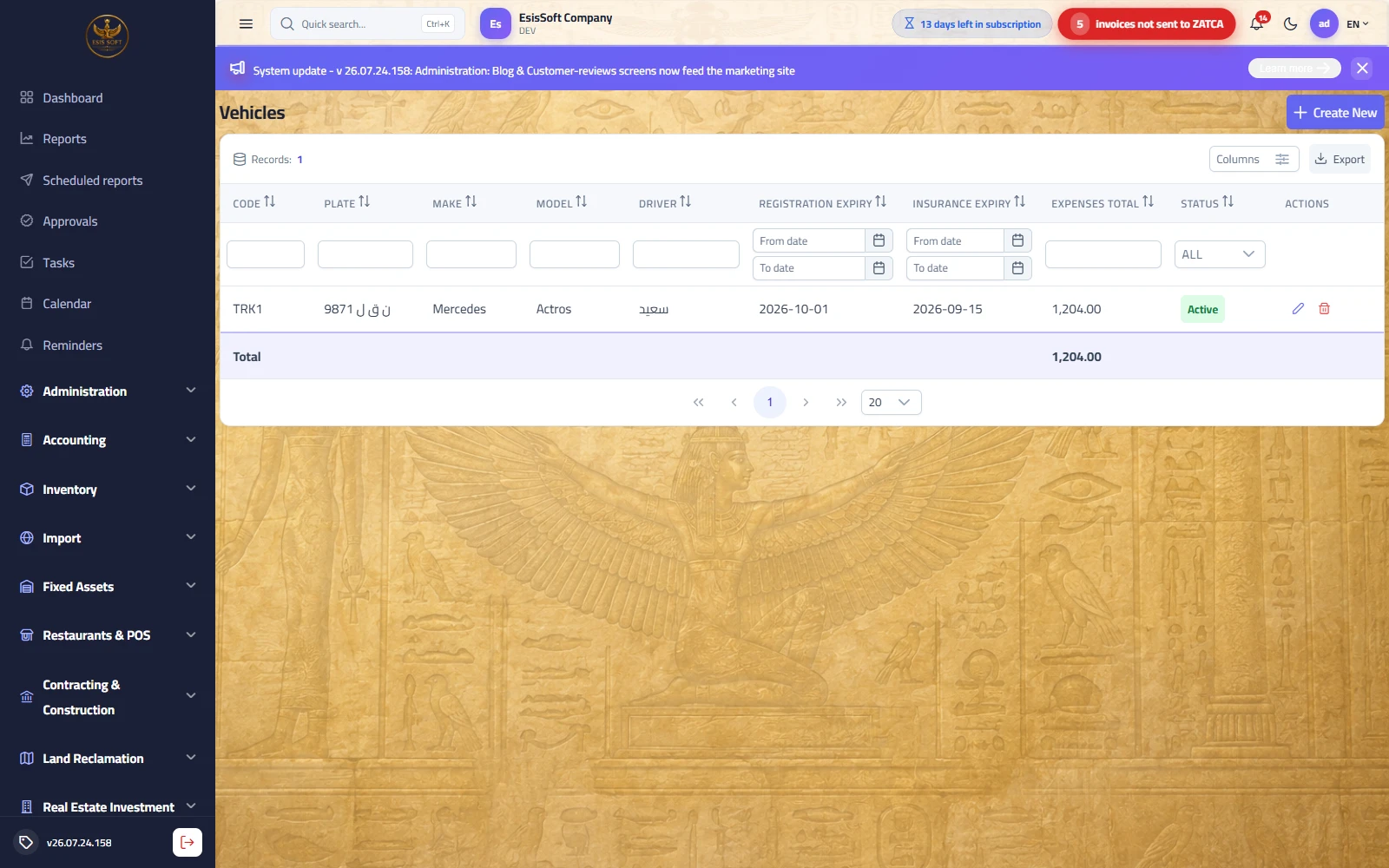
Purpose: an identity card for each vehicle in the fleet. Create it once when the vehicle enters service, then return to update registration/insurance dates and operating status. Every trip and every expense is later recorded against a vehicle from this list.
List columns
| Column | Description |
|---|---|
| Code | Sequential number generated automatically (read-only). |
| Plate | The vehicle's plate number — this is what appears in vehicle pickers on all screens. |
| Make / Model | E.g. Mercedes Actros. |
| Driver | The vehicle's usual assigned driver (optional). |
| Registration expiry / Insurance expiry | Expiry dates of the road registration and the insurance policy — see "Expiry alerts" below. |
| Expenses total | Sum of all vehicle expenses ever recorded against it, with a column total at the bottom. |
| Status | Active (green) / In maintenance (amber) / Out of service (red). |
Add / edit screen fields
| Field | Description |
|---|---|
| Code | Suggested automatically, read-only. |
| Plate | Required — the save is blocked without it. |
| Make / Model | Optional free text. |
| Year | Number between 1980 and 2100. |
| Driver | Pick from active drivers (searchable, clearable). |
| Registration expiry / Insurance expiry | Two optional, clearable dates. |
| Status | Active / In maintenance / Out of service. |
| Notes | Free text (chassis number, extra details…). |
| Active | Edit mode only — an inactive vehicle disappears from pickers in trips and expenses without losing its history. |
Buttons: Save / Save & New / Back, plus a record notes panel beside the form for follow-up notes on the vehicle.
Expiry alerts
The registration expiry and insurance expiry dates are permanent columns in the list. Make reviewing them a monthly habit: sort the list ascending on either column so the vehicles closest to expiry come first, and renew before the deadline. The system does not block operating a vehicle with an expired registration — monitoring is the fleet supervisor's responsibility.
FAQ
I sold a truck — should I delete it? If it has any expenses the system refuses deletion to preserve history — untick "Active" and set the status to "Out of service".
Does setting a vehicle to "In maintenance" block recording trips on it? No; the status is descriptive, for tracking. What hides the vehicle from pickers is deactivating it.
Where does the "Expenses total" column come from? It is the sum of the "Vehicle expenses" documents recorded against this vehicle (it does not include trip expenses recorded inside trip documents).
Drivers
Route: Fleet › Drivers — /fleet/drivers
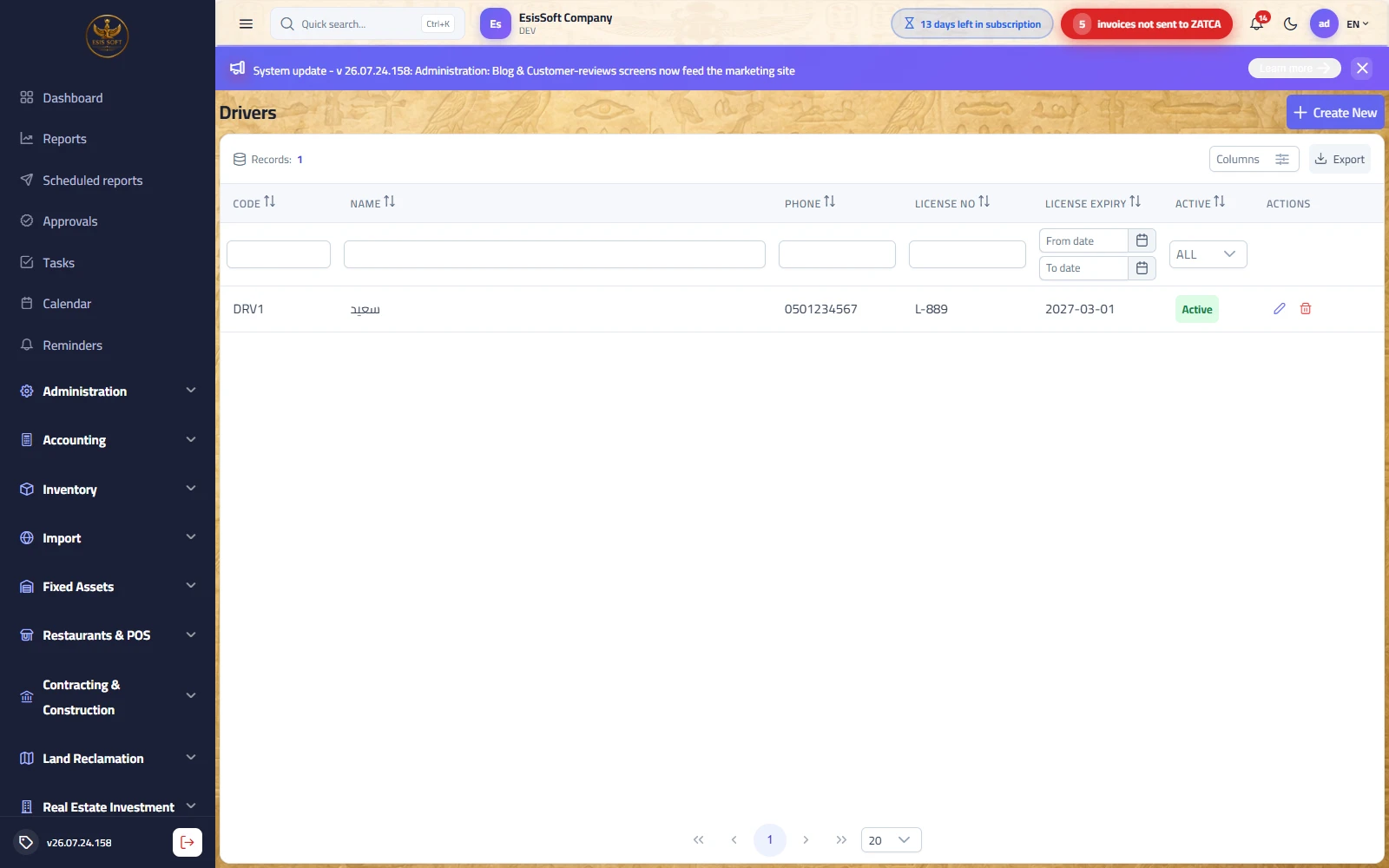
Purpose: the driver register. A driver is linked to his usual vehicle from the Vehicles screen, and each trip is attributed to its driver so you know who drove every load — and can track driving-license expiries.
Fields
| Field | Description |
|---|---|
| Code | Suggested automatically, read-only. |
| Arabic name | Required — this is what appears in lists and pickers. |
| English name | Optional; if left empty the Arabic name is used. |
| Phone | The driver's mobile — shown as a list column for quick contact. |
| License no / License expiry | Driving-license details and expiry date (both optional). |
| Active | Edit mode only — an inactive driver disappears from pickers. |
Expiry alerts
The License expiry column is always visible in the list — sort on it regularly to spot licenses close to expiry before assigning trips to their driver.
FAQ
Is the driver mandatory on a trip? No, the trip's driver field is optional — but filling it is a prerequisite for driver performance reports.
A driver left the company — what should I do? Unassign him from the vehicle, then untick "Active". His historical trips stay attributed to him.
Does a driver get a custody account in the chart of accounts? The module does not create an account per driver; cash advances are handled from the cash box and settled with actual expenses when the trip is closed (see the example on the Trips screen).
Trips (loads)
Route: Fleet › Trips — /fleet/trips
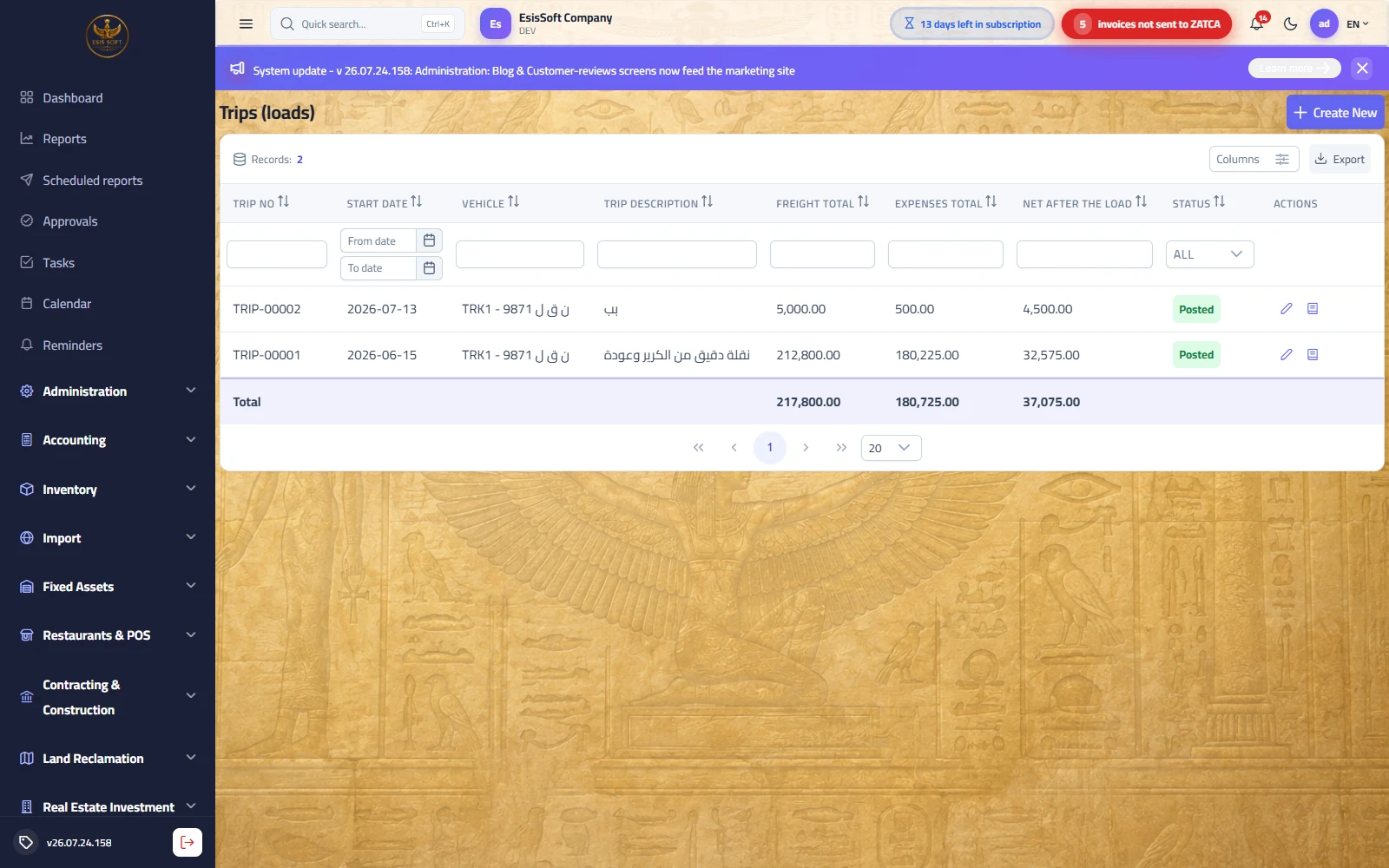
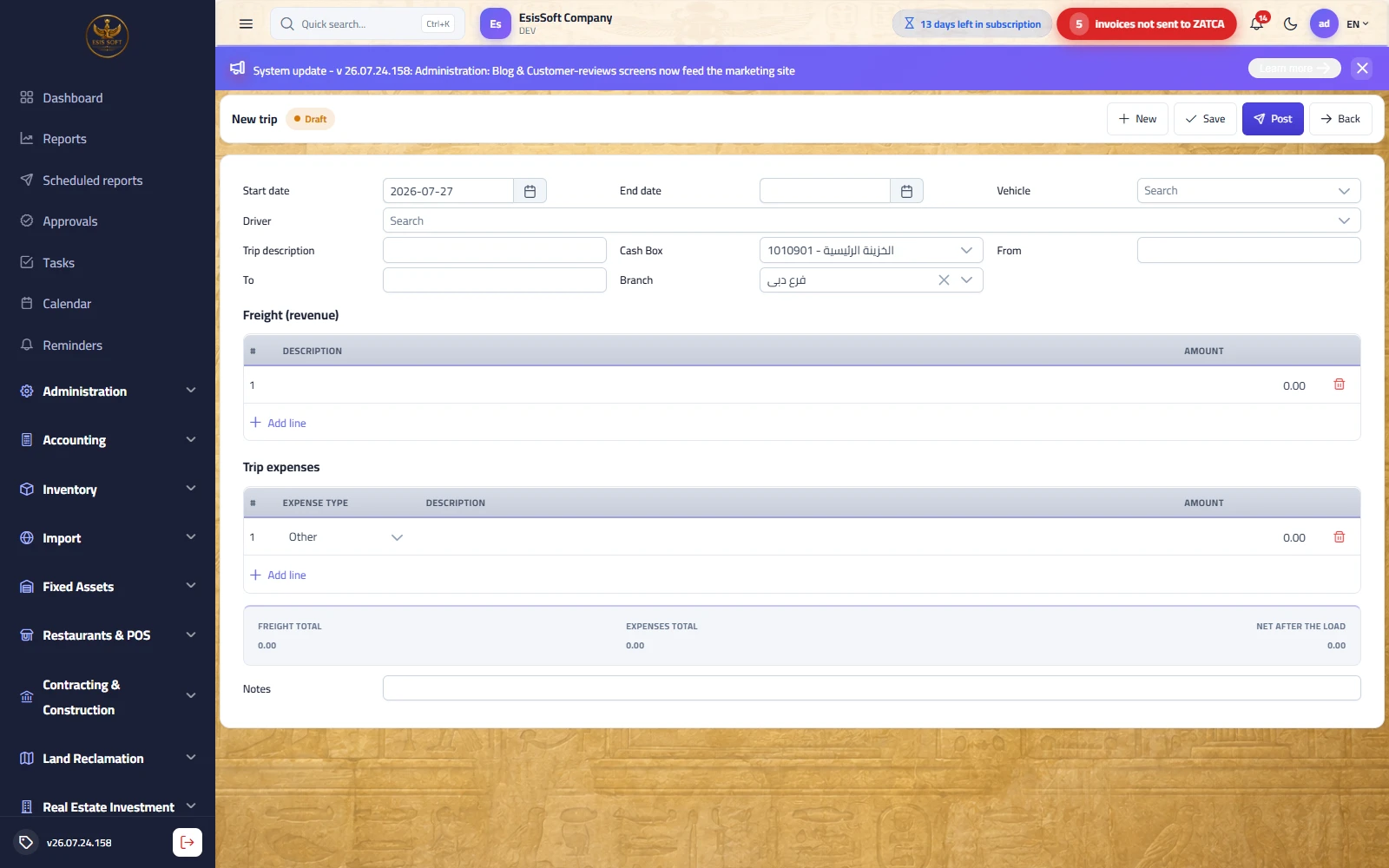
Purpose: the trip is the revenue unit — the load notebook, digitized: each load has Freight (revenue) lines, Trip expenses lines and a Net after the load strip. The document has two states: an editable, deletable Draft, then Posted after pressing "Post", which locks it and generates its journal entry.
Trip list
Columns: trip no (TRIP-00001…), start date, vehicle, trip description, freight total, expenses total, net (with totals under the numeric columns), and status. Row buttons: edit/view; View entry for posted trips; delete for drafts.
Document header fields
| Field | Description |
|---|---|
| Start date | Defaults to today. The journal entry is posted at the end date if set, otherwise the start date. |
| End date | Optional — fill it when delivery is complete. |
| Vehicle | Required — searchable picker (code - plate) over active vehicles. |
| Driver | Optional — from active drivers. |
| Trip description | Required — e.g. "Steel haul – Riyadh/Jeddah". |
| Cash Box | The cash account that receives the freight and pays the expenses — defaults to the first defined cash box. |
| From / To | Loading and unloading points (optional free text). |
| Branch | Auto-filled with the default branch, and locked when the company has a single branch. No document is saved without a branch. |
| Notes | Free text at the bottom of the screen. |
Freight lines and expense lines
| Grid | Columns | Notes |
|---|---|---|
| Freight (revenue) | Description + Amount | One line per fare item (multiple items allowed: base fare, waiting, loading…). |
| Trip expenses | Expense type + Description + Amount | Types: Fuel, Oil, Tyres, Repair, Maintenance, Other. |
Below the two grids sits the totals strip: Freight total − Expenses total = Net after the load (updated live).
Workflow
- From the trip list press Create — a draft document opens; its number is generated on save.
- Pick the vehicle and driver, and enter the trip description and the route (from / to).
- Enter the freight lines (the trip fare) and any expenses spent on it.
- Save keeps it an editable draft — convenient until the trip is finished and actual expenses are known.
- When delivery is complete, fill the end date, update expenses with actuals, then press Post.
- After posting the document is locked; review its entry with the View entry button.
Journal entry on posting (Dr/Cr)
| Account | Debit | Credit |
|---|---|---|
| Cash box — "trip freight" | Freight total | |
| Freight revenue account | Freight total | |
| Fleet expense account — "trip expenses" | Expenses total | |
| Cash box — "trip expenses" | Expenses total |
The net cash effect equals the net after the load. If the trip has no revenue (or no expenses), only the existing leg is created.
Full worked example: a trip with a driver advance
A steel load from Riyadh to Jeddah with a fare of 4,500. Before departure the cashier hands the driver a 600 fuel advance. The driver returns with actual fuel receipts of 540 and hands 60 back to the cash box.
- Create the trip: vehicle, driver, description "Steel haul", from "Riyadh" to "Jeddah", and save it as a draft on departure day.
- Freight line: "Steel load fare" for 4,500.
- After return and settlement: one expense line of type Fuel, description "Trip fuel – advance settlement", amount 540 (the actual, not the 600 handed over).
- The strip shows: freight total 4,500 − expenses total 540 = net after the load 3,960.
- Fill the end date and press Post.
The generated entry:
| Account | Debit | Credit |
|---|---|---|
| Cash box (trip freight) | 4,500 | |
| Freight revenue | 4,500 | |
| Fleet expenses (trip fuel) | 540 | |
| Cash box (trip expenses) | 540 |
Validation and common mistakes
FAQ
I posted a trip with a wrong amount — how do I fix it? A posted document is locked. The accountant makes an adjusting/reversing entry from the journal entries screen, and you create a correct trip if needed.
The freight is on credit to a customer, not cash — how do I record it? The trip's entry hits the chosen cash box. For credit freight, record the trip when it is collected, or let the accountant handle the receivable with a manual entry on the customer's account.
Can a trip have only expenses and no revenue? Yes (an empty return leg, for example) — one expense line is enough, and the net will be negative.
When is the trip number generated? On first save, as a TRIP-00001 sequence per branch. The activity log (who created, who edited) shows at the bottom of the document.
Vehicle expenses
Route: Fleet › Vehicle Expenses — /fleet/expenses
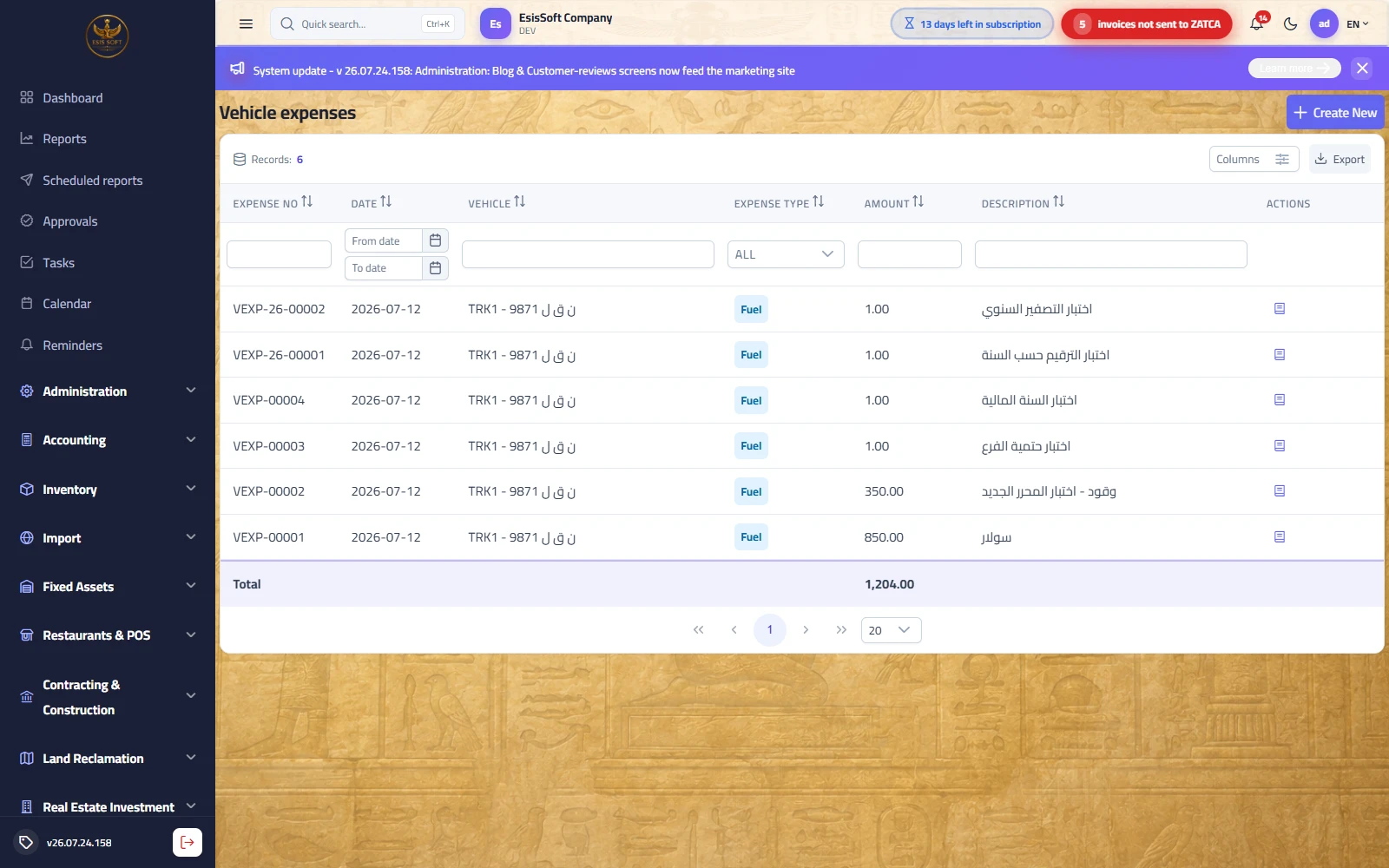
Purpose: record expenses that belong to the vehicle itself rather than to a specific load: periodic maintenance, tyres, insurance, workshop repairs, general refueling… Expenses of a specific trip belong in the "Trip expenses" lines inside the trip document itself.
List columns
| Column | Description |
|---|---|
| Expense no | Automatic sequence VEXP-00001… |
| Date | Expense date. |
| Vehicle | Code - plate. |
| Expense type | Colored badge: Fuel, Oil (blue), Tyres, Maintenance (amber), Repair (red), Other (gray). |
| Amount | With a column total at the bottom. |
| Description | Expense description. |
The only row button is View entry — because the document is posted the moment it is saved (see the warning below).
Add screen fields
| Field | Description |
|---|---|
| Date | Defaults to today. |
| Vehicle | Required — from active vehicles. |
| Expense type | Defaults to "Fuel". |
| Amount | Required, greater than zero. |
| Cash Box | The cash account it is paid from — defaults to the first cash box. |
| Odometer | Optional — the odometer reading at expense time, useful for cost-per-kilometer analysis. |
| Description | Free text (workshop name, supplier invoice number…). |
Journal entry (Dr/Cr)
| Account | Debit | Credit |
|---|---|---|
| Fleet expense account | Amount | |
| Chosen cash box | Amount |
FAQ
Do I record trip fuel here or on the trip? If it belongs to a specific load, inside the trip (so it enters its net); if it is a general refuel or maintenance, here. Never record it in both places.
The expense is on credit from a workshop (supplier)? This screen pays from a cash account only. For a credit expense use the purchasing cycle or a manual entry on the supplier's account.
Where do I see each vehicle's total expenses? The "Expenses total" column in the vehicle list, and the "Expenses by type" chart on the module dashboard.
Reading profitability: a full month for one truck
Purpose: this is how the three screens combine to tell you whether a truck is really profitable. Example: truck VEH-003 (plate 1234 TRK) during January:
| Item | Source | Amount |
|---|---|---|
| Freight of 8 posted trips | Trip list — freight total column | 32,400 |
| Trip expenses (fuel and road costs inside the documents) | Trip list — expenses total column | 5,150 |
| Net after the loads | Trip list — net column | 27,250 |
| Vehicle expense: general diesel refuel | Vehicle expenses | 1,800 |
| Vehicle expense: oil change | Vehicle expenses | 350 |
| Vehicle expense: tyres | Vehicle expenses | 900 |
| The truck's monthly profit | 27,250 − 3,050 | 24,200 |
- Open the trip list and filter by the vehicle and the date range — the totals rows under the columns give you freight, expenses and net directly.
- Open vehicle expenses and filter by the same vehicle and month — the amount column's total is the operating cost.
- Subtract: trips' net − vehicle expenses = the truck's true profit.
On the module dashboard (Home › fleet dashboard) you get, for the chosen period: KPIs for freight, expenses (trips + vehicles combined), net and active-vehicle count, a "net per trip" chart, an "expenses by type" donut, and the latest trips.
The module's journal-entry summary
| Event | Debit | Credit |
|---|---|---|
| Trip posting — revenue leg | Cash box | Freight revenue |
| Trip posting — expense leg | Fleet expenses | Cash box |
| Saving a vehicle expense | Fleet expenses | Cash box |
Vehicle revenue types and trip expense types
Path: Fleet → Master data → Vehicle revenue types — /fleet/revenue-types
What it does: Two short lists that classify what comes in and what goes out on a vehicle: the revenue type (hire, haulage, commission) and the trip expense type (fuel, driver, tolls) — so the vehicle profitability report becomes readable instead of a pile of amounts.
| Field | Description |
|---|---|
| Name | In Arabic and English. |
| Account | The revenue or expense account it posts to. |
| Active | What is no longer used is deactivated, not deleted — old movements still point at it. |
Vehicle revenues
Path: Fleet → Transactions → Vehicle revenues — /fleet/revenues
What it does: Costs alone make every vehicle a loss. Recording what a vehicle earns — its hire, a haulage fee, a commission — is what turns vehicle profitability into a real number.
| Field | Description |
|---|---|
| Vehicle and date | Which vehicle and when. |
| Revenue type | From the revenue-type list. |
| Amount and customer | The value and who paid it. |
| Receipt account | The till, the bank, or the customer’s account. |
| Posting | Posts the entry and feeds the vehicle’s statement and its profitability. |
Frequently asked questions
How do I record a trip (haul)?
Open Fleet › Trips › New, select the vehicle and driver, add freight (revenue) lines and trip expense lines; the net after load is calculated automatically.
How do I add vehicles and drivers?
Vehicles, drivers and trip types are master data with auto-generated codes; add them once and reuse them on every trip.
How are trip revenue and expenses posted?
Posting a trip books the freight revenue and expenses to the ledger and settles the net cash through the chosen treasury account.
Can I track fleet profitability?
Yes. The fleet dashboard shows freight revenue, expenses and net per trip, plus active vehicles, so you see profitability at a glance.